---
breadcrumbs:
- - /developers
- For Developers
- - /developers/design-documents
- Design Documents
page_name: print-preview
title: Print Preview
---
### Status: Draft as of 2010/10/14.
#### Objective
A feature in Chrome to let users see their printer output before sending it to
the printer.
#### Background
Web pages are generally designed to be displayed on a computer screen and are
not always optimized for printing. When a web page gets printed, the browser has
to reformat the page
to fit the physical constraints of the paper media. The web page printed to
paper may look very different from what users see on the screen. Thus users need
to be have a print preview feature in order to verify their print jobs before
sending them off to the printer, so they do not waste consumables like ink and
paper.
As of October 2010, all major browsers have a print preview feature which lets
users see what their print jobs will look like. The only exception is Chrome.
The current implementation of printing in Chrome pops up a native printer
selection dialog, where the user can select a destination printer and change
printer settings. Once the user selects print from the native printing dialog,
Chrome generates a print job and sends it off to the printer.
Overview
For print preview in Chrome, the plan is to display the print preview in a new
tab which is a DOM UI page. The print preview page will consist of a left pane
that allows for printer selection and printer options, and a right pane for
displaying the preview as well as page thumbnails.
Mocks: TODO(thestig) \[insert pictures here\]
To generate a preview that most closely resembles what will be printed, Chrome
will generate a PDF document to be sent to the printer and display it as the
preview. Chrome will leverage the existing PDF plugin it ships with to render
the PDF to screen.
#### User Experience
Users should be able to select print as they currently do with the wrench menu,
renderer context menu, and shortcut key to bring up a print preview tab. In the
print preview tab, the left pane will have a drop down list to select printers
that are currently available through the native print dialog. Below the printer
selection drop down is a list of commonly used options, including the pages to
print, the number of copies, and portrait/landscape modes. A ‘More options’
button expands the options list to show advances options when clicked.
As the user adjusts the options, the preview on the right updates to reflect the
new options the user selects. When the user finishes previewing, the user can
hit the print button to print the document or the cancel button to exit the
print preview. In addition, there will be a button so the user can access the
native print dialog. TODO(UI) - figure out details.
#### Related Work
There is ongoing work to implement a PDF backend for Skia. This backend will
enable Chrome to render web pages to consistent and size-efficient PDFs on
Windows and Linux, which have no PDF generation capabilities and poor PDF
generation capabilities, respectively. Mac OS X already has a high fidelity PDF
backend built-in.
There is ongoing work to improve the PDF plugin with additional features like
page thumbnails.
#### Implementation
The print preview feature consists of both frontend work to provide the desired
interactive user experience and backend work to generate the PDF and talk to the
printers. Another area to consider is persistent on disk data.
##### Frontend
The front end work starts with hooking up the various print commands and hot
keys to display a new tab that loads chrome://print. There will be a manager for
print preview TabContents so each existing printable tab only has at most one
print preview tab. Pressing print on a page that already has a preview tab will
just bring the preview tab into focus. The print preview tab closes
automatically when the user prints or cancels. Print preview tabs themselves are
not printable.
The PrintPreviewManager will be similar to the DevToolsManager. There is a
single instance that lives inside BrowserProcess and shares its lifetime. It
keeps a mapping of TabContents and their associated PrintPreviewUIs. The print
event handler will ask the PrintPreviewManager for a PrintPreviewUI for a given
existing tab. The PrintPreviewManager will either create a new print preview tab
and return it or return an existing print preview tab. Since the
PrintPreviewManager knows which tabs are print preview tabs, it will not create
a PrintPreviewUI for another PrintPreviewUI.
The print preview tab uses DOM UI to construct a special web page that has
privileges to communicate with the browser process. It uses IPC to talk to the
browser process to get the list of printers and set the the selected printer. It
also needs to get the html snippet for the options for the selected printer from
the browser, and send updates as the user selects options that affects the print
output.
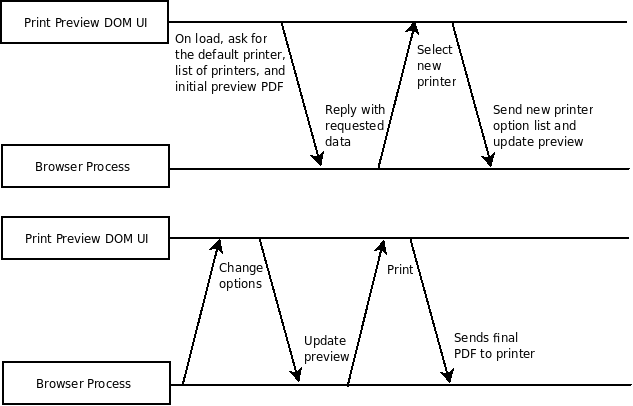 The frontend also embeds a PDF plugin to display the preview. The browser
generates the PDF and make it available to the print preview UI via a special
URL, i.e. chrome://print/foo, so the UI just needs to create <embed> tag
with the appropriate src parameter. The front end also needs to communicate with
the PDF plugin to keep the list of pages to print in sync with the thumbnail
selection inside the plugin. The DOM UI will communicate with the plugin via a
Pepper API. TODO(thestig) talk to PDF plugin folks about interfacing with the
plugin.
##### Backend
The backend code in the browser process needs to do the heavy lifting to support
all the requests coming from the front end.
To start, the browser process needs to get the list of printers and printer
options using platform specific APIs. Cloud print already has code to generate
html options code from a PPD/XPS, which is useful here. Though to make this work
on Windows XP, which does support XPS, the browser also need to be able to query
for common options from printers.
The majority of the work in the backend involves restructuring the messy
printing pipeline to support preview. The current Linux printing pipeline works
differently from Windows and Mac. Once all the platforms are brought in line,
the printing pipeline needs to be broken up into two pieces: PDF generation and
printing. The current printing pipeline waits for the user to select a printer
before generating the print output using platform specific code and sending the
output to the printer. The actual printing process uses pipelining: the renderer
generates printing metadata one page at a time, so it can generate them while
the PrintJobWorker in the browser process sends them to the printer at the same
time.
The frontend also embeds a PDF plugin to display the preview. The browser
generates the PDF and make it available to the print preview UI via a special
URL, i.e. chrome://print/foo, so the UI just needs to create <embed> tag
with the appropriate src parameter. The front end also needs to communicate with
the PDF plugin to keep the list of pages to print in sync with the thumbnail
selection inside the plugin. The DOM UI will communicate with the plugin via a
Pepper API. TODO(thestig) talk to PDF plugin folks about interfacing with the
plugin.
##### Backend
The backend code in the browser process needs to do the heavy lifting to support
all the requests coming from the front end.
To start, the browser process needs to get the list of printers and printer
options using platform specific APIs. Cloud print already has code to generate
html options code from a PPD/XPS, which is useful here. Though to make this work
on Windows XP, which does support XPS, the browser also need to be able to query
for common options from printers.
The majority of the work in the backend involves restructuring the messy
printing pipeline to support preview. The current Linux printing pipeline works
differently from Windows and Mac. Once all the platforms are brought in line,
the printing pipeline needs to be broken up into two pieces: PDF generation and
printing. The current printing pipeline waits for the user to select a printer
before generating the print output using platform specific code and sending the
output to the printer. The actual printing process uses pipelining: the renderer
generates printing metadata one page at a time, so it can generate them while
the PrintJobWorker in the browser process sends them to the printer at the same
time.
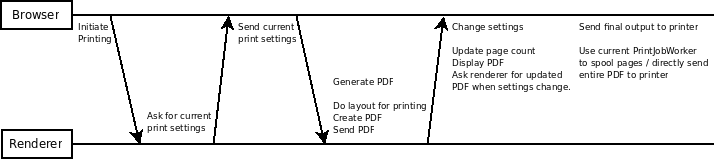
 In the printing work flow for print preview, the renderer needs to retrieve the
current printer settings, generate a PDF, and send the PDF to the browser. On
the browser side, it just displays the PDF and wait for users to tweak the
printer settings, after which the browser would ask the renderer to generate a
new PDF for previewing. This process repeats until the user finishes with
preview, after which Chrome sends the final revision of the PDF to the printer.
Whether this should be done directly or by ask the plugin to do it through parts
of the existing printing pipeline remains TBD.
In the printing work flow for print preview, the renderer needs to retrieve the
current printer settings, generate a PDF, and send the PDF to the browser. On
the browser side, it just displays the PDF and wait for users to tweak the
printer settings, after which the browser would ask the renderer to generate a
new PDF for previewing. This process repeats until the user finishes with
preview, after which Chrome sends the final revision of the PDF to the printer.
Whether this should be done directly or by ask the plugin to do it through parts
of the existing printing pipeline remains TBD.
 Points to consider are:
* The printing pipeline needs to support both the current model and
the new model while print preview development is a work in progress
behind a command line flag.
* PDF generation needs to happen in a reasonable amount of time to
ensure print preview feels responsive to the user.
* Alternatively, we can generate the PDF as a set of one page PDFs,
but the PDF viewer plugin needs to know how to display them together
as one PDF.
* Duplicate the Frame/DOM/Render tree for printing?
##### Persistent On Disk Data
The print preview feature may need to save user settings for printers to disk so
they persist between print jobs. I.e. it would be annoying to have to set the
printer to landscape, black and white, with options foo and bar every time a
user printers.
These user preferences should be stored in a new database specifically for
printer settings. This is a better alternative to storing the data directly in
the preferences file. A user with many printers can generate lots of printer
setting data that can potentially make the preferences file much bigger. This
impacts start up time since Chrome needs to load the preferences file on start
up, even though the printer settings are not used until much later.
The proposed database will contain a table for global print preview settings,
like the most recently used printers. It will also have a table for printer
settings, where the columns are printer name, setting name, and setting value.
Printer name and setting name should together form a unique key. In memory, the
representation will be the same as cloud_print::PrinterBasicInfo’s options
variable.
#### Internationalization
TODO / does the left pane need to be flipped around for RTL languages? Other
i18n issues?
#### Future Enhancements
##### Cloud Printing Integration
The initial version of print preview will only work with printers exposed by the
OS. To integrate with Cloud Printing, Chrome will need to query for cloud
printers in additional to local printers via the cloud printing APIs. Assuming
print preview uses the same code as the cloud printer server to parse PPD/XPS
files and display options, Chrome just need to get the printer info (PPD file)
and available/default paper sizes. With these two pieces of data, Chrome can
generate the option dialog and preview on its own. When the user hits the print
button, Chrome will simply send the PDF to the cloud print server instead of to
a local printer.
##### Other Enhancements
* Ability to adjust headers and footers.
* Ability to adjust margins.
* Shrink/expand to fit page
* Integration with Google Docs.
* UI feature to search for printers by name - large companies may have
many network printers available which makes it hard to select from a
list.
* Location-aware printer selection.
* Sync print preview settings to the native dialog
#### Privacy and Security Concerns
The print preview page and the PDF plugin both run inside a sandboxed renderer
process. The page does have special privileges to communicate with the browser
process to get printer options and send it print jobs. Provide the interface
between the renderer and the browser is carefully controlled, print preview
should be as secure as any other renderer process.
Points to consider are:
* The printing pipeline needs to support both the current model and
the new model while print preview development is a work in progress
behind a command line flag.
* PDF generation needs to happen in a reasonable amount of time to
ensure print preview feels responsive to the user.
* Alternatively, we can generate the PDF as a set of one page PDFs,
but the PDF viewer plugin needs to know how to display them together
as one PDF.
* Duplicate the Frame/DOM/Render tree for printing?
##### Persistent On Disk Data
The print preview feature may need to save user settings for printers to disk so
they persist between print jobs. I.e. it would be annoying to have to set the
printer to landscape, black and white, with options foo and bar every time a
user printers.
These user preferences should be stored in a new database specifically for
printer settings. This is a better alternative to storing the data directly in
the preferences file. A user with many printers can generate lots of printer
setting data that can potentially make the preferences file much bigger. This
impacts start up time since Chrome needs to load the preferences file on start
up, even though the printer settings are not used until much later.
The proposed database will contain a table for global print preview settings,
like the most recently used printers. It will also have a table for printer
settings, where the columns are printer name, setting name, and setting value.
Printer name and setting name should together form a unique key. In memory, the
representation will be the same as cloud_print::PrinterBasicInfo’s options
variable.
#### Internationalization
TODO / does the left pane need to be flipped around for RTL languages? Other
i18n issues?
#### Future Enhancements
##### Cloud Printing Integration
The initial version of print preview will only work with printers exposed by the
OS. To integrate with Cloud Printing, Chrome will need to query for cloud
printers in additional to local printers via the cloud printing APIs. Assuming
print preview uses the same code as the cloud printer server to parse PPD/XPS
files and display options, Chrome just need to get the printer info (PPD file)
and available/default paper sizes. With these two pieces of data, Chrome can
generate the option dialog and preview on its own. When the user hits the print
button, Chrome will simply send the PDF to the cloud print server instead of to
a local printer.
##### Other Enhancements
* Ability to adjust headers and footers.
* Ability to adjust margins.
* Shrink/expand to fit page
* Integration with Google Docs.
* UI feature to search for printers by name - large companies may have
many network printers available which makes it hard to select from a
list.
* Location-aware printer selection.
* Sync print preview settings to the native dialog
#### Privacy and Security Concerns
The print preview page and the PDF plugin both run inside a sandboxed renderer
process. The page does have special privileges to communicate with the browser
process to get printer options and send it print jobs. Provide the interface
between the renderer and the browser is carefully controlled, print preview
should be as secure as any other renderer process.