| Store | Purpose |
| managed_platform_prefs | contains all managed platform (non-cloud policy) preference values |
| managed_cloud_prefs | contains all managed cloud policy preference values |
| extension_prefs | contains preference values set by extensions |
| command_line_prefs | contains preference values set by command-line switches |
| user_prefs | contains all user-set preference values |
| recommended_platform_prefs | contains all recommended platform policy preference values |
| recommended_cloud_prefs | contains all recommended platform cloud preference values |
| default_prefs | contains all default preference values |
| Store in regular profile | Incognito profile |
| managed_platform_prefs | Same PrefStore as in regular profile |
| managed_cloud_prefs | Same PrefStore as in regular profile |
| extension_prefs | Special handling for different life-cycles (see below) |
| command_line_prefs | Same PrefStore as in regular profile |
| user_prefs | In-memory overlay that prevents persistence to disk |
| recommended_platform_prefs | Same PrefStore as in regular profile |
| recommended_cloud_prefs | Same PrefStore as in regular profile |
| default_prefs | Same PrefStore as in regular profile |
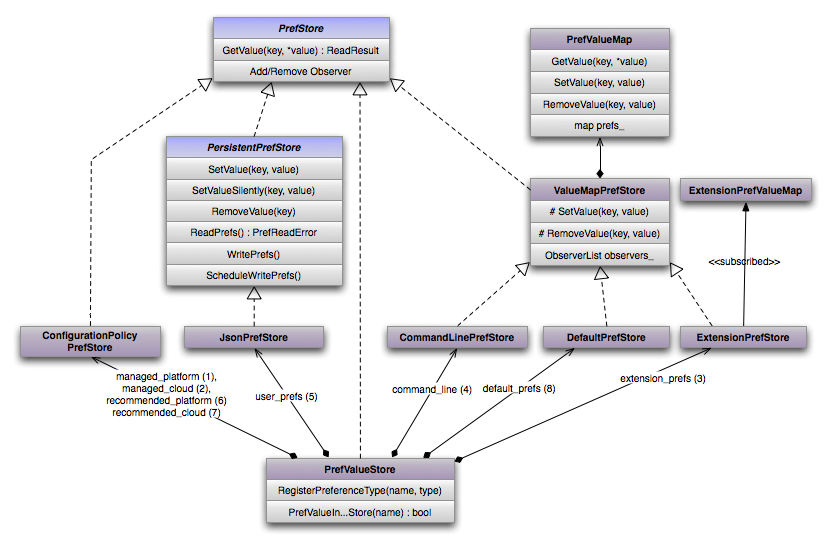 `PrefStore` is an interface that allows read access and subscription to changed
values.
The `PersistentPrefStore` interface extends this with setter methods as well as
read and write operations to load and persist the preferences to disk. The
`JsonPrefStore` implements this interface to store the “Preferences” file in the
profile on disk. The `IncognitoUserPrefStore` provides means for an in-memory
overlay. This allows storing incognito preferences that are not written to disk
but forgotten when the last incognito window is closed.
The `ConfigurationPolicyPrefStore`s handle policy driven preferences. They are
discussed in a separate chapter.
The `CommandLinePrefStore`, `DefaultPrefStore` and `ExtensionPrefStore` store
the respective types of preference values. The `ExtensionPrefStore` is discussed
in a separate chapter. These three PrefStores are based on the
`ValueMapPrefStore` which provides an in-memory implementation of a `PrefStore`
and relies on the `PrefValueMap` for this.
The `PrefValueStore` is a facade around all `PrefStores` that enforces the
precedence presented above. It maintains ownership of the respective
`PrefStore`s and asks them one by one until the first `PrefStore` contains a
specific key. `PrefValueStore` also answers questions about where a preference
value comes from. For example, client code occasionally wants to know whether a
preference is under control of the user, i.e., not forced by configuration
management or extensions.
The `PrefService` is the global interface to preferences. It supports
registering default values, and simple access to currently effective preference
values. At this abstraction layer, the `PrefValueStore` becomes an
implementation detail of the `PrefService`:
`PrefStore` is an interface that allows read access and subscription to changed
values.
The `PersistentPrefStore` interface extends this with setter methods as well as
read and write operations to load and persist the preferences to disk. The
`JsonPrefStore` implements this interface to store the “Preferences” file in the
profile on disk. The `IncognitoUserPrefStore` provides means for an in-memory
overlay. This allows storing incognito preferences that are not written to disk
but forgotten when the last incognito window is closed.
The `ConfigurationPolicyPrefStore`s handle policy driven preferences. They are
discussed in a separate chapter.
The `CommandLinePrefStore`, `DefaultPrefStore` and `ExtensionPrefStore` store
the respective types of preference values. The `ExtensionPrefStore` is discussed
in a separate chapter. These three PrefStores are based on the
`ValueMapPrefStore` which provides an in-memory implementation of a `PrefStore`
and relies on the `PrefValueMap` for this.
The `PrefValueStore` is a facade around all `PrefStores` that enforces the
precedence presented above. It maintains ownership of the respective
`PrefStore`s and asks them one by one until the first `PrefStore` contains a
specific key. `PrefValueStore` also answers questions about where a preference
value comes from. For example, client code occasionally wants to know whether a
preference is under control of the user, i.e., not forced by configuration
management or extensions.
The `PrefService` is the global interface to preferences. It supports
registering default values, and simple access to currently effective preference
values. At this abstraction layer, the `PrefValueStore` becomes an
implementation detail of the `PrefService`:
 The `PrefService` serves three purposes:
* Registering default values for preferences.
* Retrieving the currently effective preference value.
* Storing preference values in the persisted user_prefs.
The `ExtensionPrefs` class manages preference values that extensions want to
set. It persists values to disk using the `PrefService` and feeds values to the
`ExtensionPrefStore` so that the `PrefValueStore` can consider extension
controlled preferences for effective preference values. The latter happens
indirectly. The `ExtensionPrefs` instance writes the preference values into the
`ExtensionPrefValueMap` which knows about regular and incognito preferences. The
`ExtensionPrefStore`, which is specific to either a regular profile or an
incognito profile, subscribes to the `ExtensionPrefValueMap` and retrieves the
respective regular or incognito preferences.
### Notification Mechanisms
The following figure indicates how preferences are set (blue arrows) and how
change notifications are propagated to subscribers (red arrows).
The `PrefService` serves three purposes:
* Registering default values for preferences.
* Retrieving the currently effective preference value.
* Storing preference values in the persisted user_prefs.
The `ExtensionPrefs` class manages preference values that extensions want to
set. It persists values to disk using the `PrefService` and feeds values to the
`ExtensionPrefStore` so that the `PrefValueStore` can consider extension
controlled preferences for effective preference values. The latter happens
indirectly. The `ExtensionPrefs` instance writes the preference values into the
`ExtensionPrefValueMap` which knows about regular and incognito preferences. The
`ExtensionPrefStore`, which is specific to either a regular profile or an
incognito profile, subscribes to the `ExtensionPrefValueMap` and retrieves the
respective regular or incognito preferences.
### Notification Mechanisms
The following figure indicates how preferences are set (blue arrows) and how
change notifications are propagated to subscribers (red arrows).
 The blue paths are triggered in three different ways:
* Registering a default preference value: `PrefService` →
`DefaultPrefStore`
* Setting user preference (user modifies a setting in Chromium):
`PrefService` → `JsonPrefStore`
* Extension sets a preference: `ExtensionPrefs` →
`ExtensionPrefValueMap` and for persistence beyond browser sessions:
`ExtensionPrefs` → `PrefService` → `JsonPrefStore`
Helper classes like the `PrefChangeRegistrar` and `PrefMember` can be used to
subscribe to changes as outlined above.
## Extension Controlled Preferences
Some (selected) preferences can be controlled by extensions (such as the proxy
settings). These preferences need to be made available to extensions explicitly
as we do not want to allow extensions to configure all preferences.
Some particularities of extension controlled preferences need to be addressed:
* Two or more extensions might write different preference values for
the same preference. E.g. two extensions might want to set the proxy
configuration. In this case it is important to ensure that one
extension overrides the preference values of the other extension and
to guarantee a **deterministic precedence**. This means that each
time somebody requests the current value of a preference, he gets
the same reply. The precedence rule is defined as **“last extension
installed wins”**. This precedence order needs to be maintained even
between browser restarts where extensions are loaded asynchronously.
This is realized by adding a path
`extensions.settings.$EXTENSION_ID.install_time` to the Preferences
file.
* The `ExtensionPrefStore` needs to **provide values even before
extensions are started**. Imagine that a proxy extension provides
proxy configuration values that are essential for any kind of
network communication. Other extensions would not be able to
communicate until the proxy extension has been started. For this
reason, the Preferences file is extended by
`extensions.settings.$EXTENSION_ID.preferences`. At this point we
store a dictionary, whose keys are un-expanded path names that
identify the preferences. Maintaining these entries and updating the
`ExtensionPrefStore` that represents the winning preferences of
extensions is task of the `ExtensionPrefs` class.
* We want to allow using **different preference values for incognito
windows**. We support two different kinds of incognito preferences:
* **persistent_incognito** preferences are persisted in the
Preferences file as
`extension.settings.$EXTENSION_ID.incognito_preferences`. Their
life-time spans several browser sessions (i.e. browser restart)
and can be used for settings about incognito windows that are
NOT related to the specific browsing history of an incognito
session. Otherwise we would defeat the purpose of the incognito
mode (don’t store any browsing behavior related data).
* **session_only_incognito** preferences are not persisted. They
can only be set once at least one incognito window has been
opened and are cleared when the last incognito window is closed.
### Exposing preferences to extensions
In order to expose a preference to an extension, you need to follow these steps:
Add a property of type ChromeSettings to your extension namespace in the
respective file in `chrome/common/extensions/api`. This is an example from the
proxy extension:
```none
"properties": {
"settings": { // “settings” is the name of the preference exposed to the extension
"$ref": "ChromeSetting",
"description": "Proxy settings to be used. The value of this setting is a ProxyConfig object.",
"value": [
"proxy", // this is an internal, unique key referred to as “preference key” below
{"$ref": "ProxyConfig"} // this is the schema to which preferences need to comply
]
}
}
```
Add an `PrefMappingEntry` to `kPrefMapping[]` in `extension_preference_api.cc`.
You require three entries:
* Name of the preference as exposed to the extension (referred to as
“preference key” above)
* Name of the preference as handled within the browser (a string
literal in the prefs:: namespace)
* Name of the permission required to modify the preference
Optionally you can register a `PrefTransformer` to `PrefMapping::PrefMapping()`
in `extension_preference_api.cc`. This allows for a transformation of how
preferences are structured within the browser and in the extension. For example,
the Proxy Settings API exposes preferences differently to extensions than they
are stored internally.
By following these steps, we guarantee that all preferences are made available
in the same way. We provide `get()`, `set()`, and `clear()` functions as well as
an `onChanged` event.
## Configuration Policy
Configuration policy, a.k.a. admin policy, uses preferences as the main way of
exposing policy settings in the Chromium code. There are two levels policy can
come in:
* **Mandatory policy**: Settings that are forced upon the user by
their administrator. These policy settings are injected through the
`managed_platform` and `managed_cloud`
`ConfigurationPolicyPrefStore`s, which are the highest-precedence
`PrefStore`s. Any user-visible configuration settings (e.g. in
chrome://settings) should be disabled and merely show the preference
value if a policy-configured preference value is present. To
facilitate implementing this, there is
`PrefService::Preference::IsManaged()` which will return `true` if
there's a managed policy setting.
* **Recommended policy**: At the low-precedence side of the
`PrefStore` stack, there are two more
`ConfigurationPolicyPrefStore`s: `recommended_platform` and
`recommended_cloud`. These contain policy-configured values that are
not forced on the user, but merely defaults provided by the
administrator, which the user can still override. From the
perspective of the Chromium code, recommended policy shouldn't
require special handling in most cases; the PrefService will just
return the policy-configured default when appropriate.
The `ConfigurationPolicyPrefStore` objects always keep the latest known policy
configuration. Behind the scenes, the policy settings are read from the
platform's native management APIs through the `ConfigurationPolicyProvider`
abstraction, which monitors the platform's policy configuration an notifies
`ConfigurationPolicyPrefStore` to reexamine policy configuration as provided by
the ConfigurationPolicyProvider on changes. ConfigurationPolicyProvider will
then map the new configuration to preferences and expose them to PrefValueStore,
generating `PREF_CHANGED` notifications as appropriate.
Covering the design of all `ConfigurationPolicyProvider` implementations is out
of scope for this document, but here is a quick overview (see also
The blue paths are triggered in three different ways:
* Registering a default preference value: `PrefService` →
`DefaultPrefStore`
* Setting user preference (user modifies a setting in Chromium):
`PrefService` → `JsonPrefStore`
* Extension sets a preference: `ExtensionPrefs` →
`ExtensionPrefValueMap` and for persistence beyond browser sessions:
`ExtensionPrefs` → `PrefService` → `JsonPrefStore`
Helper classes like the `PrefChangeRegistrar` and `PrefMember` can be used to
subscribe to changes as outlined above.
## Extension Controlled Preferences
Some (selected) preferences can be controlled by extensions (such as the proxy
settings). These preferences need to be made available to extensions explicitly
as we do not want to allow extensions to configure all preferences.
Some particularities of extension controlled preferences need to be addressed:
* Two or more extensions might write different preference values for
the same preference. E.g. two extensions might want to set the proxy
configuration. In this case it is important to ensure that one
extension overrides the preference values of the other extension and
to guarantee a **deterministic precedence**. This means that each
time somebody requests the current value of a preference, he gets
the same reply. The precedence rule is defined as **“last extension
installed wins”**. This precedence order needs to be maintained even
between browser restarts where extensions are loaded asynchronously.
This is realized by adding a path
`extensions.settings.$EXTENSION_ID.install_time` to the Preferences
file.
* The `ExtensionPrefStore` needs to **provide values even before
extensions are started**. Imagine that a proxy extension provides
proxy configuration values that are essential for any kind of
network communication. Other extensions would not be able to
communicate until the proxy extension has been started. For this
reason, the Preferences file is extended by
`extensions.settings.$EXTENSION_ID.preferences`. At this point we
store a dictionary, whose keys are un-expanded path names that
identify the preferences. Maintaining these entries and updating the
`ExtensionPrefStore` that represents the winning preferences of
extensions is task of the `ExtensionPrefs` class.
* We want to allow using **different preference values for incognito
windows**. We support two different kinds of incognito preferences:
* **persistent_incognito** preferences are persisted in the
Preferences file as
`extension.settings.$EXTENSION_ID.incognito_preferences`. Their
life-time spans several browser sessions (i.e. browser restart)
and can be used for settings about incognito windows that are
NOT related to the specific browsing history of an incognito
session. Otherwise we would defeat the purpose of the incognito
mode (don’t store any browsing behavior related data).
* **session_only_incognito** preferences are not persisted. They
can only be set once at least one incognito window has been
opened and are cleared when the last incognito window is closed.
### Exposing preferences to extensions
In order to expose a preference to an extension, you need to follow these steps:
Add a property of type ChromeSettings to your extension namespace in the
respective file in `chrome/common/extensions/api`. This is an example from the
proxy extension:
```none
"properties": {
"settings": { // “settings” is the name of the preference exposed to the extension
"$ref": "ChromeSetting",
"description": "Proxy settings to be used. The value of this setting is a ProxyConfig object.",
"value": [
"proxy", // this is an internal, unique key referred to as “preference key” below
{"$ref": "ProxyConfig"} // this is the schema to which preferences need to comply
]
}
}
```
Add an `PrefMappingEntry` to `kPrefMapping[]` in `extension_preference_api.cc`.
You require three entries:
* Name of the preference as exposed to the extension (referred to as
“preference key” above)
* Name of the preference as handled within the browser (a string
literal in the prefs:: namespace)
* Name of the permission required to modify the preference
Optionally you can register a `PrefTransformer` to `PrefMapping::PrefMapping()`
in `extension_preference_api.cc`. This allows for a transformation of how
preferences are structured within the browser and in the extension. For example,
the Proxy Settings API exposes preferences differently to extensions than they
are stored internally.
By following these steps, we guarantee that all preferences are made available
in the same way. We provide `get()`, `set()`, and `clear()` functions as well as
an `onChanged` event.
## Configuration Policy
Configuration policy, a.k.a. admin policy, uses preferences as the main way of
exposing policy settings in the Chromium code. There are two levels policy can
come in:
* **Mandatory policy**: Settings that are forced upon the user by
their administrator. These policy settings are injected through the
`managed_platform` and `managed_cloud`
`ConfigurationPolicyPrefStore`s, which are the highest-precedence
`PrefStore`s. Any user-visible configuration settings (e.g. in
chrome://settings) should be disabled and merely show the preference
value if a policy-configured preference value is present. To
facilitate implementing this, there is
`PrefService::Preference::IsManaged()` which will return `true` if
there's a managed policy setting.
* **Recommended policy**: At the low-precedence side of the
`PrefStore` stack, there are two more
`ConfigurationPolicyPrefStore`s: `recommended_platform` and
`recommended_cloud`. These contain policy-configured values that are
not forced on the user, but merely defaults provided by the
administrator, which the user can still override. From the
perspective of the Chromium code, recommended policy shouldn't
require special handling in most cases; the PrefService will just
return the policy-configured default when appropriate.
The `ConfigurationPolicyPrefStore` objects always keep the latest known policy
configuration. Behind the scenes, the policy settings are read from the
platform's native management APIs through the `ConfigurationPolicyProvider`
abstraction, which monitors the platform's policy configuration an notifies
`ConfigurationPolicyPrefStore` to reexamine policy configuration as provided by
the ConfigurationPolicyProvider on changes. ConfigurationPolicyProvider will
then map the new configuration to preferences and expose them to PrefValueStore,
generating `PREF_CHANGED` notifications as appropriate.
Covering the design of all `ConfigurationPolicyProvider` implementations is out
of scope for this document, but here is a quick overview (see also