
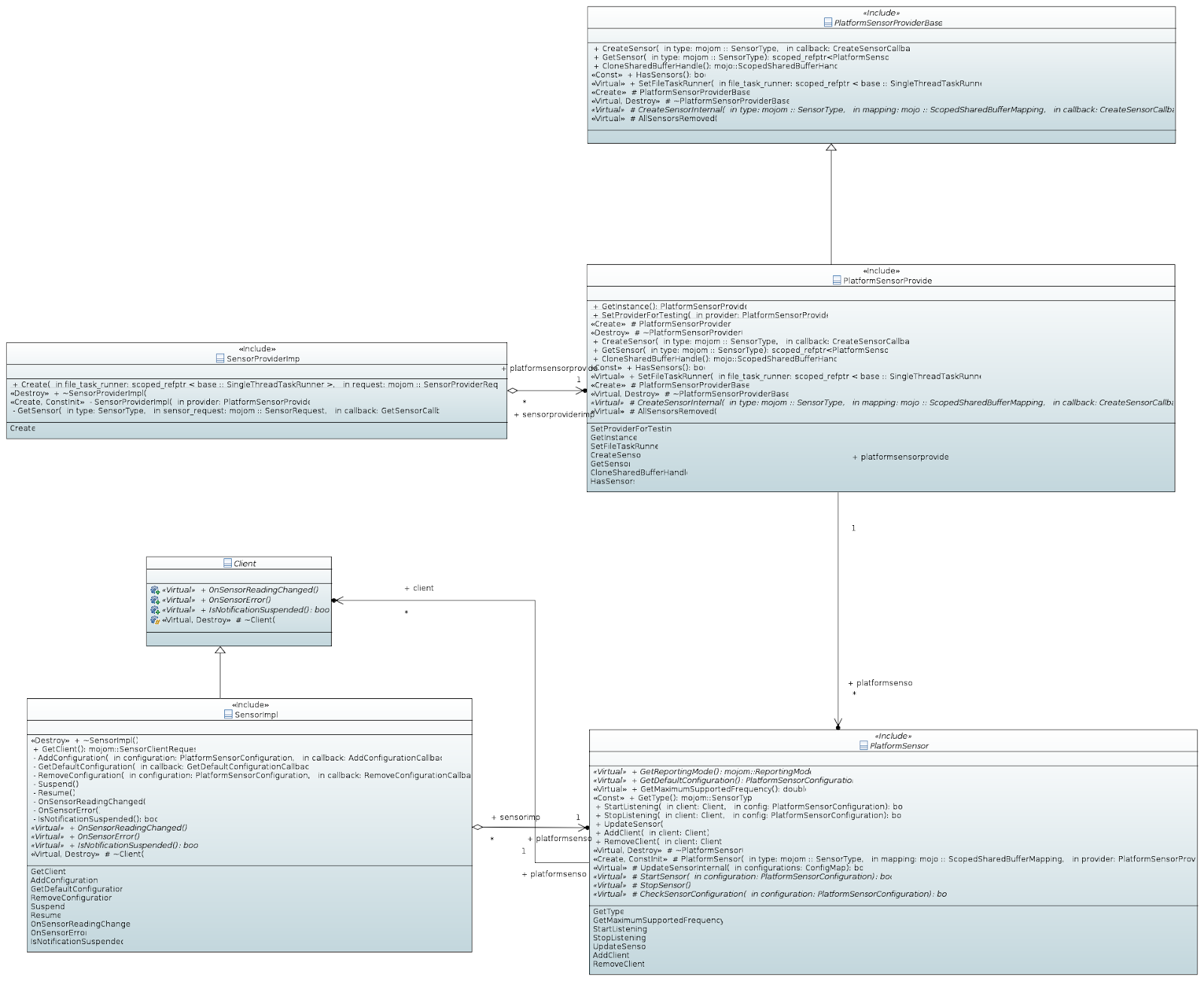
 PlatformSensorProvider is a singleton class, its main functionality is creating
and tracking PlatformSensor instances. PlatformSensorProvider is also
responsible for creating a shared buffer for sensor readings. Every platform has
its own implementation of PlatformSensorProvider (PlatformSensorProviderAndroid,
PlatformSensorProviderWin, ...), generic part of the functionality is
encapsulated inside the inherited PlatformSensorProviderBase class.
PlatformSensor represents device sensor of a given type, there can be only one
PlatformSensor instance of the same type at the time, its ownership is shared
between existing SensorImpl instances. PlatformSensor is an abstract class which
encapsulates generic functionality and is inherited by the platform-specific
implementations (PlatformSensorAndroid, PlatformSensorWin, ...).
SensorImpl class implements the exposed Sensor mojo interface and forwards IPC
calls to the owned PlatformSensor instance. SensorImpl implements
PlatformSensor::Client interface to receive notifications from PlatformSensor.
SensorProviderImpl class implements the exposed SensorProvider mojo interface
and forwards IPC calls to the PlatformSensorProvider singleton instance.
## Sensor module in Bink
Blink side class diagram is shown below.
PlatformSensorProvider is a singleton class, its main functionality is creating
and tracking PlatformSensor instances. PlatformSensorProvider is also
responsible for creating a shared buffer for sensor readings. Every platform has
its own implementation of PlatformSensorProvider (PlatformSensorProviderAndroid,
PlatformSensorProviderWin, ...), generic part of the functionality is
encapsulated inside the inherited PlatformSensorProviderBase class.
PlatformSensor represents device sensor of a given type, there can be only one
PlatformSensor instance of the same type at the time, its ownership is shared
between existing SensorImpl instances. PlatformSensor is an abstract class which
encapsulates generic functionality and is inherited by the platform-specific
implementations (PlatformSensorAndroid, PlatformSensorWin, ...).
SensorImpl class implements the exposed Sensor mojo interface and forwards IPC
calls to the owned PlatformSensor instance. SensorImpl implements
PlatformSensor::Client interface to receive notifications from PlatformSensor.
SensorProviderImpl class implements the exposed SensorProvider mojo interface
and forwards IPC calls to the PlatformSensorProvider singleton instance.
## Sensor module in Bink
Blink side class diagram is shown below.
 Sensor - implements bindings for the
[Sensor](https://w3c.github.io/sensors/#the-sensor-interface) interface. All
classes that implement concrete sensor interfaces (such as AmbientLightSensor,
Gyroscope, Accelerometer) must be inherited from it.
SensorReading - implements bindings for the
[SensorReading](https://w3c.github.io/sensors/#the-sensor-reading-interface) IDL
interface. All classes that implement concrete sensor reading interfaces (e.g.
GyroscopeReading) must be inherited from it.
SensorProxy wraps the mojom::Sensor mojo interface proxy and itself implements
mojom::SensorClient interface. It provides nested SensorProxy::Observer
interface which is inherited by Sensor class in order to receive notification
from platform side.
SensorProxy contains the SensorReading instance which is shared between all
Sensor instances inside the frame.
Inside a frame there can be only one SensorProxy instance for a concrete sensor
type (i.e. ambient light, accelerometer) at the time and its ownership is shared
between Sensor instances. SensorProxy instance is created at first
Sensor.start() method call and destroyed when there are no more active Sensor
instances left.
SensorProviderProxy wraps 'SensorProvider' mojo interface proxy and manages
'SensorProxy' instances. Sensor implementation obtains SensorProviderProxy
instance as a LocalFrame supplement and uses it to the get SensorProxy instance
for the needed type.
SensorReadingUpdater abstract class (and its implementations
SensorReadingUpdaterOnChange and SensorReadingUpdaterContinuous) encapsulates
the logic for sending 'onchange' event which depends on sensor's reporting mode.
## Sensor shared buffer
Sensor shared buffer is used to transfer sensor readings from browser process to
renderer process. Read-write operations are synchronized via seqlock mechanism.
GSF uses a single shared memory buffer which is divided into chunks - sensor
reading buffers, one chunk per sensor type. Every sensor reading buffer contains
6 tightly packed 64-bit floating fields: { seqlock, timestamp, sensor reading 1,
sensor reading 2, sensor reading 3, sensor reading 4 }, so it has fixed size 6
\* 8 = 48 bytes.
Please see
[sensor_reading.h](https://cs.chromium.org/chromium/src/services/device/public/cpp/generic_sensor/sensor_reading.h)
for more details.
## Sensor configurations management
This paragraph describes the implementation of logic behind
[Sensor.reading](https://w3c.github.io/sensors/#sensor-reading) update and
sending of [Sensor.onchange](https://w3c.github.io/sensors/#sensor-onchange)
event. The issue here is that relationship between device sensor and
corresponding JS sensor instances is one-to-many, and each JS sensor instance
may have different configuration.
In GSF the resulting configuration which is applied to the device sensor is the
highest from the currently existing JS sensors configurations. The following
object diagram illustrates these logic with example of four sensor instances of
the same type and they have different sampling frequencies: 1Hz, 50Hz, 10Hz,
20Hz.
The maximum sampling frequency used is 50 Hz and PlatformSensor updates shared
buffer using this frequency.
Sensor - implements bindings for the
[Sensor](https://w3c.github.io/sensors/#the-sensor-interface) interface. All
classes that implement concrete sensor interfaces (such as AmbientLightSensor,
Gyroscope, Accelerometer) must be inherited from it.
SensorReading - implements bindings for the
[SensorReading](https://w3c.github.io/sensors/#the-sensor-reading-interface) IDL
interface. All classes that implement concrete sensor reading interfaces (e.g.
GyroscopeReading) must be inherited from it.
SensorProxy wraps the mojom::Sensor mojo interface proxy and itself implements
mojom::SensorClient interface. It provides nested SensorProxy::Observer
interface which is inherited by Sensor class in order to receive notification
from platform side.
SensorProxy contains the SensorReading instance which is shared between all
Sensor instances inside the frame.
Inside a frame there can be only one SensorProxy instance for a concrete sensor
type (i.e. ambient light, accelerometer) at the time and its ownership is shared
between Sensor instances. SensorProxy instance is created at first
Sensor.start() method call and destroyed when there are no more active Sensor
instances left.
SensorProviderProxy wraps 'SensorProvider' mojo interface proxy and manages
'SensorProxy' instances. Sensor implementation obtains SensorProviderProxy
instance as a LocalFrame supplement and uses it to the get SensorProxy instance
for the needed type.
SensorReadingUpdater abstract class (and its implementations
SensorReadingUpdaterOnChange and SensorReadingUpdaterContinuous) encapsulates
the logic for sending 'onchange' event which depends on sensor's reporting mode.
## Sensor shared buffer
Sensor shared buffer is used to transfer sensor readings from browser process to
renderer process. Read-write operations are synchronized via seqlock mechanism.
GSF uses a single shared memory buffer which is divided into chunks - sensor
reading buffers, one chunk per sensor type. Every sensor reading buffer contains
6 tightly packed 64-bit floating fields: { seqlock, timestamp, sensor reading 1,
sensor reading 2, sensor reading 3, sensor reading 4 }, so it has fixed size 6
\* 8 = 48 bytes.
Please see
[sensor_reading.h](https://cs.chromium.org/chromium/src/services/device/public/cpp/generic_sensor/sensor_reading.h)
for more details.
## Sensor configurations management
This paragraph describes the implementation of logic behind
[Sensor.reading](https://w3c.github.io/sensors/#sensor-reading) update and
sending of [Sensor.onchange](https://w3c.github.io/sensors/#sensor-onchange)
event. The issue here is that relationship between device sensor and
corresponding JS sensor instances is one-to-many, and each JS sensor instance
may have different configuration.
In GSF the resulting configuration which is applied to the device sensor is the
highest from the currently existing JS sensors configurations. The following
object diagram illustrates these logic with example of four sensor instances of
the same type and they have different sampling frequencies: 1Hz, 50Hz, 10Hz,
20Hz.
The maximum sampling frequency used is 50 Hz and PlatformSensor updates shared
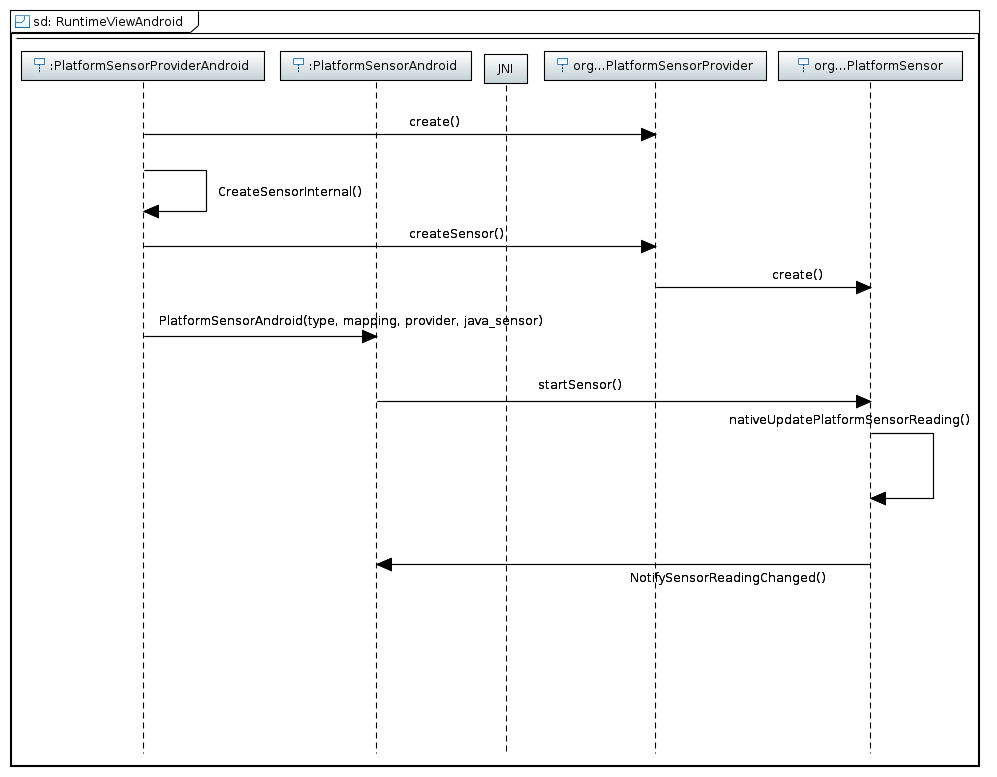
buffer using this frequency. 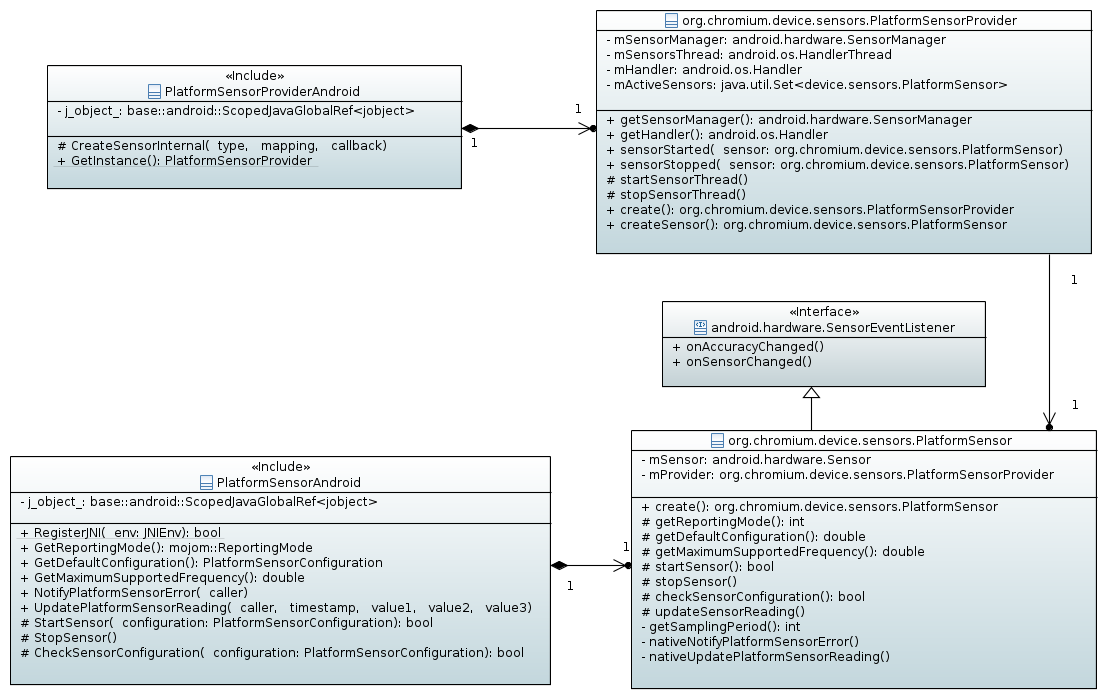 The adaptation for Android platform consists of two parts, native (C++) and
java. Native adaptation includes PlatformSensorProviderAndroid and
PlatformSensorAndroid C++ classes, while java counterpart consists of
PlatformSensorProvider and PlatformSensor java classes that are included in
org.chromium.device.sensors package. Java classes interface with Android Sensor
API to fetch reading from device sensors. Native side and java classes
communicate with each other over JNI interface.
The PlatformSensorProviderAndroid class implements PlatformSensorProvider
interface and responsible for creation of PlatformSensorProvider instance over
JNI, when java object is created, all sensor creation requests are forwarded to
java object.
The PlatformSensorAndroid class implements PlatformSensor interface, owns
PlatformSensor java object and forwards start, stop and other requests to it.
The PlatformSensorProvider java object is responsible for thread management, and
PlatformSensor creation, it also owns Android SensorManager object that is
accessed by PlatformSensor java objects.
The PlatformSensor java object implements SensorEventListener interface and owns
Android Sensor object. The PlatformSensor adds itself as a event listener for a
Sensor to receive sensor reading updates and forwards them to native side using
native\* methods.
Simplified runtime view.
The adaptation for Android platform consists of two parts, native (C++) and
java. Native adaptation includes PlatformSensorProviderAndroid and
PlatformSensorAndroid C++ classes, while java counterpart consists of
PlatformSensorProvider and PlatformSensor java classes that are included in
org.chromium.device.sensors package. Java classes interface with Android Sensor
API to fetch reading from device sensors. Native side and java classes
communicate with each other over JNI interface.
The PlatformSensorProviderAndroid class implements PlatformSensorProvider
interface and responsible for creation of PlatformSensorProvider instance over
JNI, when java object is created, all sensor creation requests are forwarded to
java object.
The PlatformSensorAndroid class implements PlatformSensor interface, owns
PlatformSensor java object and forwards start, stop and other requests to it.
The PlatformSensorProvider java object is responsible for thread management, and
PlatformSensor creation, it also owns Android SensorManager object that is
accessed by PlatformSensor java objects.
The PlatformSensor java object implements SensorEventListener interface and owns
Android Sensor object. The PlatformSensor adds itself as a event listener for a
Sensor to receive sensor reading updates and forwards them to native side using
native\* methods.
Simplified runtime view.
 O
## Implementation on Windows
O
## Implementation on Windows
 The adaptation layer for Generic Sensors on Windows platform uses Windows Sensor
API that provides COM interfaces to interact with platform sensors. The
adaptation consists of three main classes: PlatformSensorProviderWin,
PlatformSensorWin and PlatformSensorReaderWin.
All Windows Sensor API COM objects and PlatformSensorReaderWin are created on
sensors thread, while PlatformSensorProviderWin and PlatformSensorWin live on
IPC thread and communicate with Generic Sensor API mojo interfaces.
The PlatformSensorProviderWin implements PlatformSensorProvider interface, it is
responsible for creation of PlatformSensorWin and PlatformSensorReaderWin
instances. It also manages COM object ISensorManager and sensor thread where all
COM objects are created.
The PlatformSensorReaderWin communicates with ISensor interface to configure it
and get readings from ISensor COM object. The EventListener class implements
ISensorEvents interface to get notifications about sensor state changes and
delivers sensor readings to parent class PlatformSensorReaderWin that in turn,
forwards sensor readings to PlatformSensorWin through
PlatformSensorReaderWin::Client interface that is implemented by
PlatformSensorWin.
The PlatformSensorWin implements PlatformSensor and controls
PlatformSensorReaderWin state using StartSensor() and StopSensor() methods.
Implements PlatformSensorReaderWin::Client interface to receive notifications
about new readings or error conditions.
Simplified runtime view.
The adaptation layer for Generic Sensors on Windows platform uses Windows Sensor
API that provides COM interfaces to interact with platform sensors. The
adaptation consists of three main classes: PlatformSensorProviderWin,
PlatformSensorWin and PlatformSensorReaderWin.
All Windows Sensor API COM objects and PlatformSensorReaderWin are created on
sensors thread, while PlatformSensorProviderWin and PlatformSensorWin live on
IPC thread and communicate with Generic Sensor API mojo interfaces.
The PlatformSensorProviderWin implements PlatformSensorProvider interface, it is
responsible for creation of PlatformSensorWin and PlatformSensorReaderWin
instances. It also manages COM object ISensorManager and sensor thread where all
COM objects are created.
The PlatformSensorReaderWin communicates with ISensor interface to configure it
and get readings from ISensor COM object. The EventListener class implements
ISensorEvents interface to get notifications about sensor state changes and
delivers sensor readings to parent class PlatformSensorReaderWin that in turn,
forwards sensor readings to PlatformSensorWin through
PlatformSensorReaderWin::Client interface that is implemented by
PlatformSensorWin.
The PlatformSensorWin implements PlatformSensor and controls
PlatformSensorReaderWin state using StartSensor() and StopSensor() methods.
Implements PlatformSensorReaderWin::Client interface to receive notifications
about new readings or error conditions.
Simplified runtime view.
 ## Implementation on Chrome OS and Linux
ChromeOS (CrOS) and Linux Operating Systems (OS) share the same code base except
for some auxiliary data structures, which are used to read sensor values in a
right order and in accordance to Generic Sensor API specifications, and
functions, which are used to apply scaling value, offset value and other values
to keep readings in single units of measurement.
Sensor data is read using Industrial Input/Output (IIO) APIs. There are two ways
to read data:
Using sysfs paths.
Using device node interface.
Our implementation is using sysfs for both CrOS and Linux platforms. The problem
with the device node interface is that it requires device nodes to be accessible
not only by root but by a user without root rights, who runs Chromium or Chrome
browser. While the mentioned problem concerns only Linux distributions, CrOS
involves another problem - data cannot be read by multiple clients
simultaneously, which is true for Linux platform as well. As far as we know,
there is an AccelerometerReader that uses this interface to read accelerometer
data for CrOS specific components in the browser. To be more precise, the
interface uses a ring buffer, whose values are erased after reading happens or
buffer is full. If there are two simultaneous clients trying to read from the
same buffer, both of them will miss data which will cause performance and
reliability issues. There is a new feature in the latest kernel - two and more
simultaneous reads can be done for the same device node interface, but this
feature is still in staging.
The implementation on CrOS and Linux involves several classes - a
PlatformSensorProviderLinux, derived from a PlatformSensorProvider, a
PlatformSensorLinux derived from a PlatformSensor, a SensorDeviceManager and a
SensorReader, which is a base class for a PollingSensorReader.
## Implementation on Chrome OS and Linux
ChromeOS (CrOS) and Linux Operating Systems (OS) share the same code base except
for some auxiliary data structures, which are used to read sensor values in a
right order and in accordance to Generic Sensor API specifications, and
functions, which are used to apply scaling value, offset value and other values
to keep readings in single units of measurement.
Sensor data is read using Industrial Input/Output (IIO) APIs. There are two ways
to read data:
Using sysfs paths.
Using device node interface.
Our implementation is using sysfs for both CrOS and Linux platforms. The problem
with the device node interface is that it requires device nodes to be accessible
not only by root but by a user without root rights, who runs Chromium or Chrome
browser. While the mentioned problem concerns only Linux distributions, CrOS
involves another problem - data cannot be read by multiple clients
simultaneously, which is true for Linux platform as well. As far as we know,
there is an AccelerometerReader that uses this interface to read accelerometer
data for CrOS specific components in the browser. To be more precise, the
interface uses a ring buffer, whose values are erased after reading happens or
buffer is full. If there are two simultaneous clients trying to read from the
same buffer, both of them will miss data which will cause performance and
reliability issues. There is a new feature in the latest kernel - two and more
simultaneous reads can be done for the same device node interface, but this
feature is still in staging.
The implementation on CrOS and Linux involves several classes - a
PlatformSensorProviderLinux, derived from a PlatformSensorProvider, a
PlatformSensorLinux derived from a PlatformSensor, a SensorDeviceManager and a
SensorReader, which is a base class for a PollingSensorReader.
 PlatformSensorProviderLinux is a singleton class that processes requests for new
sensors. It uses composition and holds a unique pointer to a SensorDeviceManager
object, which sends notifications about added and removed iio sensors back to it
using a Delegate pattern. The PlatformSensorProviderLinux has a SensorDeviceMap
cache, which is an unordered map that stores a pair of a mojom::SensorType key
and a std::unique_ptr<SensorInfoLinux> structure, which represents a
structure of an existing iio device. The structure’s members will be discussed
further along with the implementation of the SensorDeviceManager.
The SensorDeviceMap is a cache, which is used to store type to structure pairs
of all known IIO sensors provided by an OS and is used to create sensors of
requested types. When a request for a specific type of sensor comes
(PlatformSensorProviderLinux::CreateSensorInternal is called), the provider
checks if the SensorDeviceManager has been started and enumeration has been
done. If not, the provider starts the manager and waits until it enumerates all
iio devices available to create PlatformSensorLinux sensors asynchronously,
otherwise the provider checks if it has a SensorInfoLinux for a specific sensor
type in its cache. Then it creates a platform sensor passing SensorInfoLinux to
it, which will use the structure to set own frequency, reporting mode and then
passes the structure to a SensorReader created by that sensor.
Once enumeration is done, the provider starts to process stored in
std::vector<mojom::SensorType> requests according their types by
enumerating own cache and looking for a SensorInfoLinux structure that
represents the requested type of a sensor.
As previously said, the PlatformSensorLinux creates a SensorReader and passes a
SensorInfoLinux structure to it. The reader has a static factory method
SensorReader::Create, which creates a PollingSensorReader (we will implement
triggered sensor reader, which will use the device node interface in the future
once all problems regarding this reading strategy are resolved). The reader uses
the SensorInfoLinux structure and stores sysfs paths, which are used to read iio
sensor values, offset value, scaling value and a functor -
SensorPathsLinux::ReaderFunctor, which is used to apply scaling and offset
values and invert signs if needed. A base::RepeatingTimer is used to instantiate
readings using a frequency provided by a PlatformSensorLinux.
SensorDeviceManager is a class that uses LinuxDeviceMonitor to enumerate
devices, listen to "add/removed" events and then notify the
PlatformSensorProviderLinux about added or removed IIO devices. It has own cache
to speed up an identification process of removed devices. The LinuxDeviceMonitor
is a class that listens for notifications from libudev about
connected/disconnected devices. When the manager is started, it adds itself as
an observer to the LinuxDeviceMonitor and asks to enumerate devices. During
enumeration, the provider gets notifications about found sensors and updates its
cache.
PlatformSensorProviderLinux is a singleton class that processes requests for new
sensors. It uses composition and holds a unique pointer to a SensorDeviceManager
object, which sends notifications about added and removed iio sensors back to it
using a Delegate pattern. The PlatformSensorProviderLinux has a SensorDeviceMap
cache, which is an unordered map that stores a pair of a mojom::SensorType key
and a std::unique_ptr<SensorInfoLinux> structure, which represents a
structure of an existing iio device. The structure’s members will be discussed
further along with the implementation of the SensorDeviceManager.
The SensorDeviceMap is a cache, which is used to store type to structure pairs
of all known IIO sensors provided by an OS and is used to create sensors of
requested types. When a request for a specific type of sensor comes
(PlatformSensorProviderLinux::CreateSensorInternal is called), the provider
checks if the SensorDeviceManager has been started and enumeration has been
done. If not, the provider starts the manager and waits until it enumerates all
iio devices available to create PlatformSensorLinux sensors asynchronously,
otherwise the provider checks if it has a SensorInfoLinux for a specific sensor
type in its cache. Then it creates a platform sensor passing SensorInfoLinux to
it, which will use the structure to set own frequency, reporting mode and then
passes the structure to a SensorReader created by that sensor.
Once enumeration is done, the provider starts to process stored in
std::vector<mojom::SensorType> requests according their types by
enumerating own cache and looking for a SensorInfoLinux structure that
represents the requested type of a sensor.
As previously said, the PlatformSensorLinux creates a SensorReader and passes a
SensorInfoLinux structure to it. The reader has a static factory method
SensorReader::Create, which creates a PollingSensorReader (we will implement
triggered sensor reader, which will use the device node interface in the future
once all problems regarding this reading strategy are resolved). The reader uses
the SensorInfoLinux structure and stores sysfs paths, which are used to read iio
sensor values, offset value, scaling value and a functor -
SensorPathsLinux::ReaderFunctor, which is used to apply scaling and offset
values and invert signs if needed. A base::RepeatingTimer is used to instantiate
readings using a frequency provided by a PlatformSensorLinux.
SensorDeviceManager is a class that uses LinuxDeviceMonitor to enumerate
devices, listen to "add/removed" events and then notify the
PlatformSensorProviderLinux about added or removed IIO devices. It has own cache
to speed up an identification process of removed devices. The LinuxDeviceMonitor
is a class that listens for notifications from libudev about
connected/disconnected devices. When the manager is started, it adds itself as
an observer to the LinuxDeviceMonitor and asks to enumerate devices. During
enumeration, the provider gets notifications about found sensors and updates its
cache.

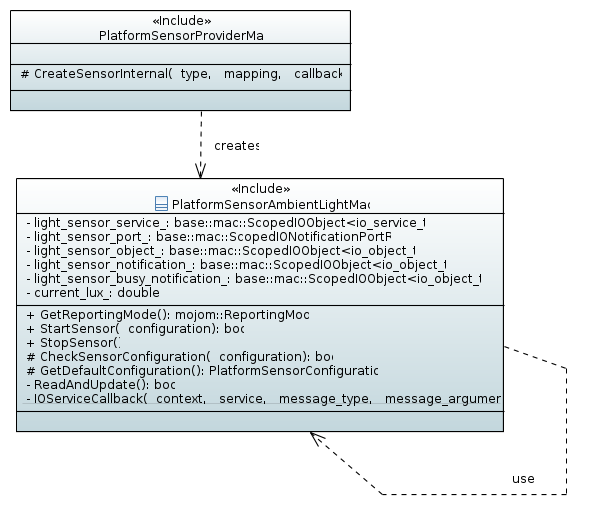
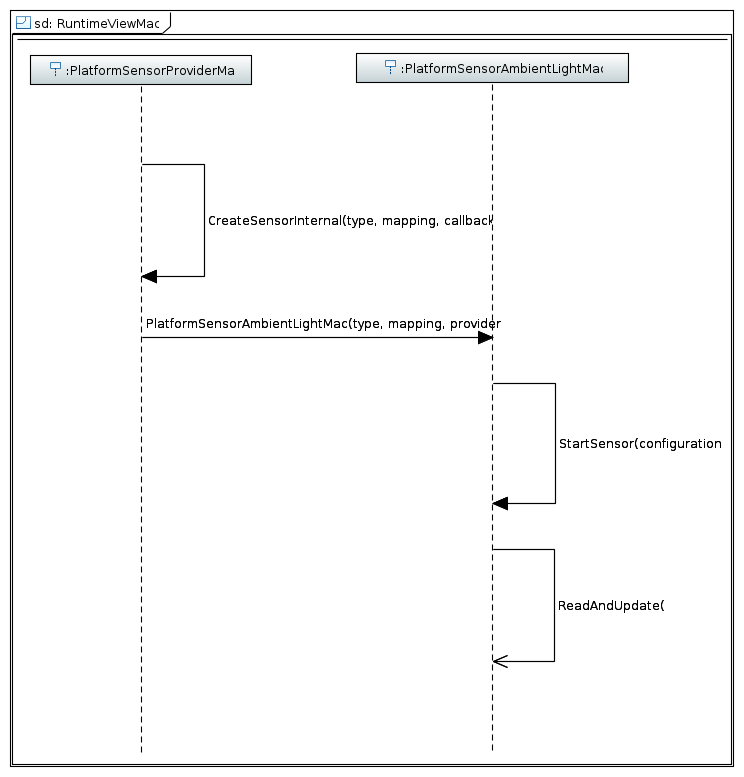
| Sensor | Fusion sensor | Access to low level data | Security impact | Proposed security policy |
| Accelerometer | No | Easy | High | auto-grant + opt-out |
| LinearAccelerationSensor | Yes | Easy | High | auto-grant + opt-out |
| GravitySensor | Yes | Difficult | High | auto-grant + opt-out |
| Gyroscope | No | Easy | High | auto-grant + opt-out |
| Magnetometer | No | Easy | Medium ? | auto-grant + upt-out UI |
| AmbientLight, rounded lux | No | Easy | Medium ? | auto-grant + upt-out UI |
| AbsoluteOrientation | Yes | Difficult | High | auto-grant + opt-out |
| RelativeOrientation | Yes | Difficult | High | auto-grant + opt-out |
| GeomagneticOrientation | Yes | Difficult | High | auto-grant + opt-out |
| Sensor | Security tokens |
| Accelerometer | “accelerometer” |
| LinearAccelerationSensor | “accelerometer” |
| GravitySensor | “accelerometer” |
| Gyroscope | “gyroscope” |
| Magnetometer | “magnetometer” |
| AmbientLight, rounded lux | “ambient-light-sensor” |
| AbsoluteOrientationSensor | \[“accelerometer”, “gyroscope”, “magnetometer”\] |
| RelativeOrientationSensor | \[“accelerometer”, “gyroscope”\] |
| GeomagneticOrientationSensor | \[“accelerometer”, “magnetometer”\] |
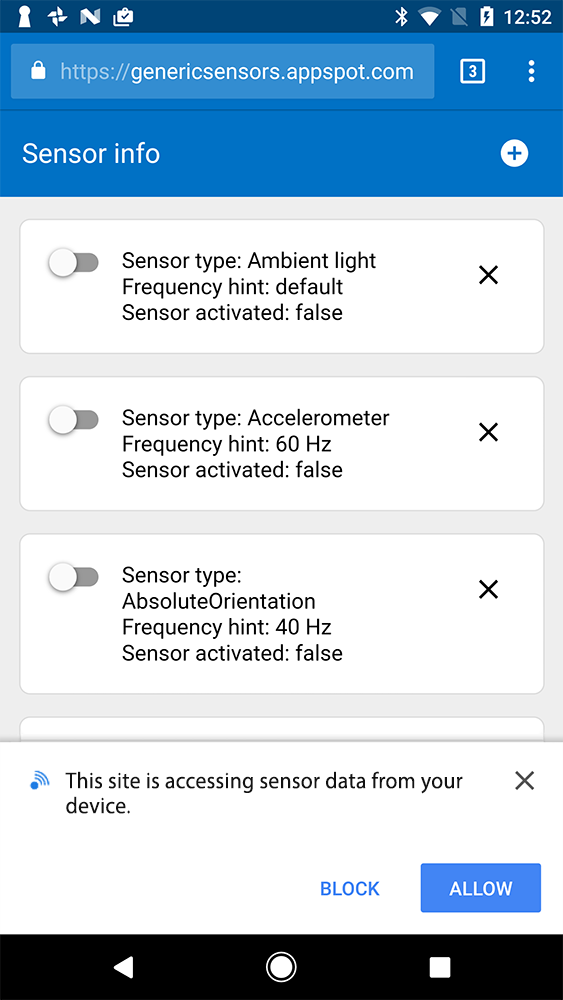
 If “always block” is selected by the user, Chrome should (options):
Block all sensors?
Block particular set of sensors?
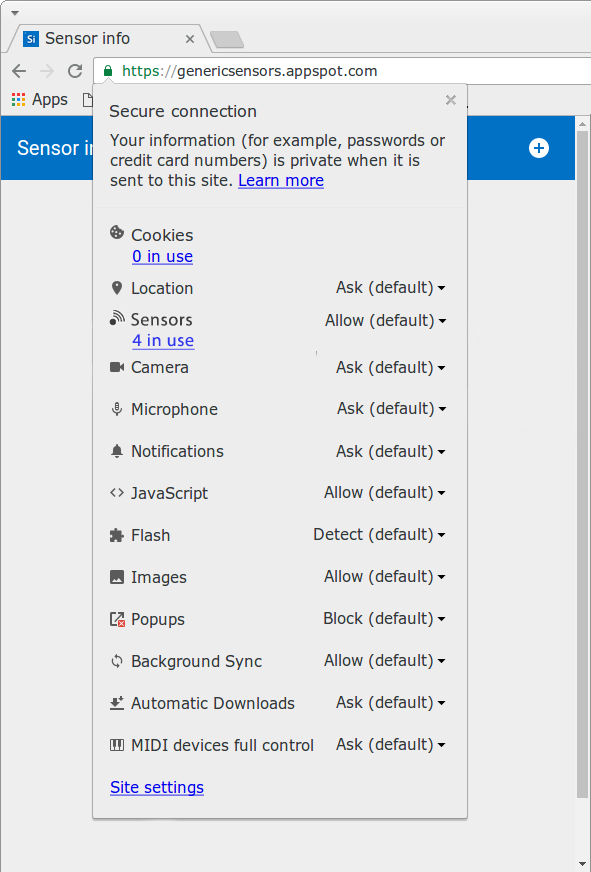
### Site settings UI with granular permission settings
If “always block” is selected by the user, Chrome should (options):
Block all sensors?
Block particular set of sensors?
### Site settings UI with granular permission settings
|
# |
 |
 |

 |
 |