---
breadcrumbs:
- - /developers
- For Developers
- - /developers/design-documents
- Design Documents
page_name: displaying-a-web-page-in-chrome
title: How Chromium Displays Web Pages
---
This document describes how web pages are displayed in Chromium from the bottom
up. Be sure you have read the [multi-process
architecture](/developers/design-documents/multi-process-architecture) design
document. You will especially want to understand the block diagram of major
components. You may also be interested in [multi-process resource
loading](/developers/design-documents/multi-process-resource-loading) for how
pages are fetched from the network.
## Conceptual application layers
[ ](https://docs.google.com/drawings/pub?id=1gdSTfvLxbJDbX8oiWo5LTwAmXmdMQvjoUhYEhfhj0-k&w=473&h=204)
(The original Google Doc for this illustration is http://goo.gl/MsEJX which is
open for editing by any @chromium.org)
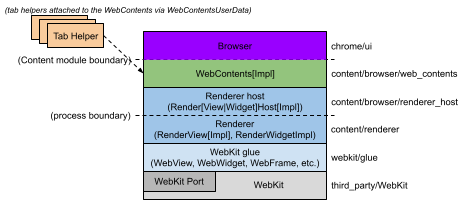
Each box represents a conceptual application layer. No layer should have
knowledge of or dependencies on any higher-level layers.
* **WebKit:** Rendering engine shared between Safari, Chromium, and
all other WebKit-based browsers. The **Port** is a part of WebKit
that integrates with platform dependent system services such as
resource loading and graphics.
* **Glue:** Converts WebKit types to Chromium types. This is our
"WebKit embedding layer." It is the basis of two browsers, Chromium,
and test_shell (which allows us to test WebKit).
* **Renderer / Render host:** This is Chromium's "multi-process
embedding layer." It proxies notifications and commands across the
process boundary.
* **WebContents:** A reusable component that is the main class of the
Content module. It's easily embeddable to allow multiprocess
rendering of HTML into a view. See the [content module
pages](/developers/content-module) for more information.
* **Browser:** Represents the browser window, it contains multiple
WebContentses.
* **Tab Helpers**: Individual objects that can be attached to a
WebContents (via the WebContentsUserData mixin). The Browser
attaches an assortment of them to the WebContentses that it holds
(one for favicons, one for infobars, etc).
## WebKit
We use the [WebKit](http://webkit.org/) open-source project to lay out web
pages. This code is pulled from Apple and stored in the /third_party/WebKit
directory. WebKit consists primarily of "WebCore" which represents the core
layout functionality, and "JavaScriptCore" which runs JavaScript. We only run
JavaScriptCore for testing purposes, normally we replace it with our high
performance V8 JavaScript engine. We do not actually use the layer that Apple
calls "WebKit," which is the embedding API between WebCore and OS X applications
such as Safari. We normally refer to the code from Apple generically as "WebKit"
for convenience.
### The WebKit port
At the lowest level we have our WebKit "port." This is our implementation of
required platform-specific functionality that interfaces with the
platform-independent WebCore code. These files are located in the WebKit tree,
typically in chromium directories or as Chromium-suffixed files. Much of our
port is not actually OS-specific: you could think of it as the "Chromium port"
of WebCore. Some parts, like font rendering, must be handled differently for
each platform.
* Network traffic is handled by our [multi-process resource
loading](/developers/design-documents/multi-process-resource-loading)
system rather than being handed off to the OS directly from the
render process.
* Graphics uses the Skia graphics library developed for Android. This
is a cross-platform graphics library and handles all images and
graphics primitives except for text. Skia is located in
/third_party/skia. The main entrypoint for graphics operations is
/webkit/port/platform/graphics/GraphicsContextSkia.cpp. It uses many
other files in the same directory as well as from /base/gfx.
### The WebKit glue
The Chromium application uses different types, coding styles, and code layout
than the third-party WebKit code. The WebKit "glue" provides a more convenient
embedding API for WebKit using Google coding conventions and types (for example,
we use std::string instead of WebCore::String and GURL instead of KURL). The
glue code is located in /webkit/glue. The glue objects are typically named
similar to the WebKit objects, but with "Web" at the beginning. For example,
WebCore::Frame becomes WebFrame.
The WebKit "glue" layer insulates the rest of the Chromium code base from
WebCore data types to help minimize the impact of WebCore changes on the
Chromium code base. As such, WebCore data types are never used directly by
Chromium. APIs are added to the WebKit "glue" for the benefit of Chromium when
it needs to poke at some WebCore object.
The "test shell" application is a bare-bones web browser for testing our WebKit
port and glue code. It uses the same glue interface for communicating with
WebKit as Chromium does. It provides a simpler way for developers to test new
code without having many complicated browser features, threads, and processes.
This application is also used to run the automated WebKit tests. However, the
downside of the "test shell" is that it doesn't exercise WebKit as Chromium
does, in a multi-process way. The content module is embedded in an application
called "content shell" which will soon be running the tests instead.
## The render process
[
](https://docs.google.com/drawings/pub?id=1gdSTfvLxbJDbX8oiWo5LTwAmXmdMQvjoUhYEhfhj0-k&w=473&h=204)
(The original Google Doc for this illustration is http://goo.gl/MsEJX which is
open for editing by any @chromium.org)
Each box represents a conceptual application layer. No layer should have
knowledge of or dependencies on any higher-level layers.
* **WebKit:** Rendering engine shared between Safari, Chromium, and
all other WebKit-based browsers. The **Port** is a part of WebKit
that integrates with platform dependent system services such as
resource loading and graphics.
* **Glue:** Converts WebKit types to Chromium types. This is our
"WebKit embedding layer." It is the basis of two browsers, Chromium,
and test_shell (which allows us to test WebKit).
* **Renderer / Render host:** This is Chromium's "multi-process
embedding layer." It proxies notifications and commands across the
process boundary.
* **WebContents:** A reusable component that is the main class of the
Content module. It's easily embeddable to allow multiprocess
rendering of HTML into a view. See the [content module
pages](/developers/content-module) for more information.
* **Browser:** Represents the browser window, it contains multiple
WebContentses.
* **Tab Helpers**: Individual objects that can be attached to a
WebContents (via the WebContentsUserData mixin). The Browser
attaches an assortment of them to the WebContentses that it holds
(one for favicons, one for infobars, etc).
## WebKit
We use the [WebKit](http://webkit.org/) open-source project to lay out web
pages. This code is pulled from Apple and stored in the /third_party/WebKit
directory. WebKit consists primarily of "WebCore" which represents the core
layout functionality, and "JavaScriptCore" which runs JavaScript. We only run
JavaScriptCore for testing purposes, normally we replace it with our high
performance V8 JavaScript engine. We do not actually use the layer that Apple
calls "WebKit," which is the embedding API between WebCore and OS X applications
such as Safari. We normally refer to the code from Apple generically as "WebKit"
for convenience.
### The WebKit port
At the lowest level we have our WebKit "port." This is our implementation of
required platform-specific functionality that interfaces with the
platform-independent WebCore code. These files are located in the WebKit tree,
typically in chromium directories or as Chromium-suffixed files. Much of our
port is not actually OS-specific: you could think of it as the "Chromium port"
of WebCore. Some parts, like font rendering, must be handled differently for
each platform.
* Network traffic is handled by our [multi-process resource
loading](/developers/design-documents/multi-process-resource-loading)
system rather than being handed off to the OS directly from the
render process.
* Graphics uses the Skia graphics library developed for Android. This
is a cross-platform graphics library and handles all images and
graphics primitives except for text. Skia is located in
/third_party/skia. The main entrypoint for graphics operations is
/webkit/port/platform/graphics/GraphicsContextSkia.cpp. It uses many
other files in the same directory as well as from /base/gfx.
### The WebKit glue
The Chromium application uses different types, coding styles, and code layout
than the third-party WebKit code. The WebKit "glue" provides a more convenient
embedding API for WebKit using Google coding conventions and types (for example,
we use std::string instead of WebCore::String and GURL instead of KURL). The
glue code is located in /webkit/glue. The glue objects are typically named
similar to the WebKit objects, but with "Web" at the beginning. For example,
WebCore::Frame becomes WebFrame.
The WebKit "glue" layer insulates the rest of the Chromium code base from
WebCore data types to help minimize the impact of WebCore changes on the
Chromium code base. As such, WebCore data types are never used directly by
Chromium. APIs are added to the WebKit "glue" for the benefit of Chromium when
it needs to poke at some WebCore object.
The "test shell" application is a bare-bones web browser for testing our WebKit
port and glue code. It uses the same glue interface for communicating with
WebKit as Chromium does. It provides a simpler way for developers to test new
code without having many complicated browser features, threads, and processes.
This application is also used to run the automated WebKit tests. However, the
downside of the "test shell" is that it doesn't exercise WebKit as Chromium
does, in a multi-process way. The content module is embedded in an application
called "content shell" which will soon be running the tests instead.
## The render process
[ ](/developers/design-documents/displaying-a-web-page-in-chrome/Renderingintherenderer-v2.png)
Chromium's render process embeds our WebKit port using the glue interface. It
does not contain very much code: its job is primarily to be the renderer side of
the [IPC](/developers/design-documents/inter-process-communication) channel to
the browser..
The most important class in the renderer is the RenderView, located in
/content/renderer/render_view_impl.cc. This object represents a web page. It
handles all navigation-related commands to and from the browser process. It
derives from RenderWidget which provides painting and input event handling. The
RenderView communicates with the browser process via the global (per render
process) RenderProcess object.
FAQ: What's the difference between RenderWidget and RenderView? RenderWidget
maps to one WebCore::Widget object by implementing the abstract interface in the
glue layer called WebWidgetDelegate.. This is basically a Window on the screen
that receives input events and that we paint into. A RenderView inherits from
RenderWidget and is the contents of a tab or popup Window. It handles
navigational commands in addition to the painting and input events of the
widget. There is only one case where a RenderWidget exists without a RenderView,
and that's for select boxes on the web page. These are the boxes with the down
arrows that pop up a list of options. The select boxes must be rendered using a
native window so that they can appear above everything else, and pop out of the
frame if necessary. These windows need to paint and receive input, but there
isn't a separate "web page" (RenderView) for them.
### Threads in the renderer
Each renderer has two threads (see the [multi-process
architecture](/developers/design-documents/multi-process-architecture) page for
a diagram, or [threading in Chromium](/developers/design-documents/threading)
for how to program with them). The render thread is where the main objects such
as the RenderView and all WebKit code run. When it communicates to the browser,
messages are first sent to the main thread, which in turn dispatches the message
to the browser process. Among other things, this allows us to send messages
synchronously from the renderer to the browser. This happens for a small set of
operations where a result from the browser is required to continue. An example
is getting the cookies for a page when requested by JavaScript. The renderer
thread will block, and the main thread will queue all messages that are received
until the correct response is found. Any messages received in the meantime are
subsequently posted to the renderer thread for normal processing.
## The browser process
[
](/developers/design-documents/displaying-a-web-page-in-chrome/Renderingintherenderer-v2.png)
Chromium's render process embeds our WebKit port using the glue interface. It
does not contain very much code: its job is primarily to be the renderer side of
the [IPC](/developers/design-documents/inter-process-communication) channel to
the browser..
The most important class in the renderer is the RenderView, located in
/content/renderer/render_view_impl.cc. This object represents a web page. It
handles all navigation-related commands to and from the browser process. It
derives from RenderWidget which provides painting and input event handling. The
RenderView communicates with the browser process via the global (per render
process) RenderProcess object.
FAQ: What's the difference between RenderWidget and RenderView? RenderWidget
maps to one WebCore::Widget object by implementing the abstract interface in the
glue layer called WebWidgetDelegate.. This is basically a Window on the screen
that receives input events and that we paint into. A RenderView inherits from
RenderWidget and is the contents of a tab or popup Window. It handles
navigational commands in addition to the painting and input events of the
widget. There is only one case where a RenderWidget exists without a RenderView,
and that's for select boxes on the web page. These are the boxes with the down
arrows that pop up a list of options. The select boxes must be rendered using a
native window so that they can appear above everything else, and pop out of the
frame if necessary. These windows need to paint and receive input, but there
isn't a separate "web page" (RenderView) for them.
### Threads in the renderer
Each renderer has two threads (see the [multi-process
architecture](/developers/design-documents/multi-process-architecture) page for
a diagram, or [threading in Chromium](/developers/design-documents/threading)
for how to program with them). The render thread is where the main objects such
as the RenderView and all WebKit code run. When it communicates to the browser,
messages are first sent to the main thread, which in turn dispatches the message
to the browser process. Among other things, this allows us to send messages
synchronously from the renderer to the browser. This happens for a small set of
operations where a result from the browser is required to continue. An example
is getting the cookies for a page when requested by JavaScript. The renderer
thread will block, and the main thread will queue all messages that are received
until the correct response is found. Any messages received in the meantime are
subsequently posted to the renderer thread for normal processing.
## The browser process
[ ](/developers/design-documents/displaying-a-web-page-in-chrome/rendering%20browser.png)
### Low-level browser process objects
All [IPC](/developers/design-documents/inter-process-communication)
communication with the render processes is done on the I/O thread of the
browser. This thread also handles all [network
communication](/developers/design-documents/multi-process-resource-loading)
which keeps it from interfering with the user interface.
When a RenderProcessHost is initialized on the main thread (where the user
interface runs), it creates the new renderer process and a ChannelProxy
[IPC](/developers/design-documents/inter-process-communication) object with a
named pipe to the renderer. This object runs on the I/O thread of the browser,
listening to the named pipe to the renderer, and automatically forwards all
messages back to the RenderProcessHost on the UI thread. A ResourceMessageFilter
will be installed in this channel which will filter out certain messages that
can be handled directly on the I/O thread such as network requests. This
filtering happens in ResourceMessageFilter::OnMessageReceived.
The RenderProcessHost on the UI thread is responsible for dispatching all
view-specific messages to the appropriate RenderViewHost (it handles a limited
number of non-view-specific messages itself). This dispatching happens in
RenderProcessHost::OnMessageReceived.
### High-level browser process objects
View-specific messages come into RenderViewHost::OnMessageReceived. Most of the
messages are handled here, and the rest get forwarded to the RenderWidgetHost
base class. These two objects map to the RenderView and the RenderWidget in the
renderer (see "The Render Process" above for what these mean). Each platform has
a view class (RenderWidgetHostView\[Aura|Gtk|Mac|Win\]) to implement integration
into the native view system.
Above the RenderView/Widget is the WebContents object, and most of the messages
actually end up as function calls on that object. A WebContents represents the
contents of a webpage. It is the top-level object in the content module, and has
the responsibility of displaying a web page in a rectangular view. See the
[content module pages](/developers/content-module) for more information.
The WebContents object is contained in a TabContentsWrapper. That is in chrome/
and is responsible for a tab.
**Illustrative examples**
Additional examples covering navigation and startup are in [Getting Around the
Chromium Source
Code](/developers/how-tos/getting-around-the-chrome-source-code).
### Life of a "set cursor" message
Setting the cursor is an example of a typical message that is sent from the
renderer to the browser. In the renderer, here is what happens.
* Set cursor messages are generated by WebKit internally, typically in
response to an input event. The set cursor message will start out in
RenderWidget::SetCursor in content/renderer/render_widget.cc.
* It will call RenderWidget::Send to dispatch the message. This method
is also used by RenderView to send messages to the browser. It will
call RenderThread::Send.
* This will call the IPC::SyncChannel which will internally proxy the
message to the main thread of the renderer and post it to the named
pipe for sending to the browser.
Then the browser takes control:
* The IPC::ChannelProxy in the RenderProcessHost receives all message
on the I/O thread of the browser. It first sends them through the
ResourceMessageFilter that dispatches network requests and related
messages directly on the I/O thread. Since our message is not
filtered out, it continues on to the UI thread of the browser (the
IPC::ChannelProxy does this internally).
* RenderProcessHost::OnMessageReceived in
content/browser/renderer_host/render_process_host_impl.cc gets the
messages for all views in the corresponding render process. It
handles several types of messages directly, and for the rest
forwards to the appropriate RenderViewHost corresponding to the
source RenderView that sent the message.
* The message arrives at RenderViewHost::OnMessageReceived in
content/browser/renderer_host/render_view_host_impl.cc. Many
messages are handled here, but ours is not because it's a message
sent from the RenderWidget and handled by the RenderWidgetHost.
* All unhandled messages in RenderViewHost are automatically forwarded
to the RenderWidgetHost, including our set cursor message.
* The message map in
content/browser/renderer_host/render_view_host_impl.cc finally
receives the message in RenderWidgetHost::OnMsgSetCursor and calls
the appropriate UI function to set the mouse cursor.
### Life of a "mouse click" message
Sending a mouse click is a typical example of a message going from the browser
to the renderer.
* The Windows message is received on the UI thread of the browser by
RenderWidgetHostViewWin::OnMouseEvent which then calls
ForwardMouseEventToRenderer in the same class.
* The forwarder function packages the input event into a
cross-platform WebMouseEvent and ends up sending it to the
RenderWidgetHost it is associated with.
* RenderWidgetHost::ForwardInputEvent creates an IPC message
ViewMsg_HandleInputEvent, serializes the WebInputEvent to it, and
calls RenderWidgetHost::Send.
* This just forwards to the owning RenderProcessHost::Send function,
which in turn gives the message to the IPC::ChannelProxy.
* Internally, the IPC::ChannelProxy will proxy the message to the I/O
thread of the browser and write it to the named pipe of the
corresponding renderer.
Note that many other types of messages are created in the WebContents,
especially navigational ones. These follow a similar path from the WebContents
to the RenderViewHost.
Then the renderer takes control:
* IPC::Channel on the main thread of the renderer reads the message
sent by the browser, and IPC::ChannelProxy proxies to the renderer
thread.
* RenderView::OnMessageReceived gets the message. Many types messages
are handled here directly. Since the click message is not, it falls
through (with all other unhandled messages) to
RenderWidget::OnMessageReceived which in turn forwards it to
RenderWidget::OnHandleInputEvent.
* The input event is given to WebWidgetImpl::HandleInputEvent where it
is converted to a WebKit PlatformMouseEvent class and given to the
WebCore::Widget class inside WebKit.
](/developers/design-documents/displaying-a-web-page-in-chrome/rendering%20browser.png)
### Low-level browser process objects
All [IPC](/developers/design-documents/inter-process-communication)
communication with the render processes is done on the I/O thread of the
browser. This thread also handles all [network
communication](/developers/design-documents/multi-process-resource-loading)
which keeps it from interfering with the user interface.
When a RenderProcessHost is initialized on the main thread (where the user
interface runs), it creates the new renderer process and a ChannelProxy
[IPC](/developers/design-documents/inter-process-communication) object with a
named pipe to the renderer. This object runs on the I/O thread of the browser,
listening to the named pipe to the renderer, and automatically forwards all
messages back to the RenderProcessHost on the UI thread. A ResourceMessageFilter
will be installed in this channel which will filter out certain messages that
can be handled directly on the I/O thread such as network requests. This
filtering happens in ResourceMessageFilter::OnMessageReceived.
The RenderProcessHost on the UI thread is responsible for dispatching all
view-specific messages to the appropriate RenderViewHost (it handles a limited
number of non-view-specific messages itself). This dispatching happens in
RenderProcessHost::OnMessageReceived.
### High-level browser process objects
View-specific messages come into RenderViewHost::OnMessageReceived. Most of the
messages are handled here, and the rest get forwarded to the RenderWidgetHost
base class. These two objects map to the RenderView and the RenderWidget in the
renderer (see "The Render Process" above for what these mean). Each platform has
a view class (RenderWidgetHostView\[Aura|Gtk|Mac|Win\]) to implement integration
into the native view system.
Above the RenderView/Widget is the WebContents object, and most of the messages
actually end up as function calls on that object. A WebContents represents the
contents of a webpage. It is the top-level object in the content module, and has
the responsibility of displaying a web page in a rectangular view. See the
[content module pages](/developers/content-module) for more information.
The WebContents object is contained in a TabContentsWrapper. That is in chrome/
and is responsible for a tab.
**Illustrative examples**
Additional examples covering navigation and startup are in [Getting Around the
Chromium Source
Code](/developers/how-tos/getting-around-the-chrome-source-code).
### Life of a "set cursor" message
Setting the cursor is an example of a typical message that is sent from the
renderer to the browser. In the renderer, here is what happens.
* Set cursor messages are generated by WebKit internally, typically in
response to an input event. The set cursor message will start out in
RenderWidget::SetCursor in content/renderer/render_widget.cc.
* It will call RenderWidget::Send to dispatch the message. This method
is also used by RenderView to send messages to the browser. It will
call RenderThread::Send.
* This will call the IPC::SyncChannel which will internally proxy the
message to the main thread of the renderer and post it to the named
pipe for sending to the browser.
Then the browser takes control:
* The IPC::ChannelProxy in the RenderProcessHost receives all message
on the I/O thread of the browser. It first sends them through the
ResourceMessageFilter that dispatches network requests and related
messages directly on the I/O thread. Since our message is not
filtered out, it continues on to the UI thread of the browser (the
IPC::ChannelProxy does this internally).
* RenderProcessHost::OnMessageReceived in
content/browser/renderer_host/render_process_host_impl.cc gets the
messages for all views in the corresponding render process. It
handles several types of messages directly, and for the rest
forwards to the appropriate RenderViewHost corresponding to the
source RenderView that sent the message.
* The message arrives at RenderViewHost::OnMessageReceived in
content/browser/renderer_host/render_view_host_impl.cc. Many
messages are handled here, but ours is not because it's a message
sent from the RenderWidget and handled by the RenderWidgetHost.
* All unhandled messages in RenderViewHost are automatically forwarded
to the RenderWidgetHost, including our set cursor message.
* The message map in
content/browser/renderer_host/render_view_host_impl.cc finally
receives the message in RenderWidgetHost::OnMsgSetCursor and calls
the appropriate UI function to set the mouse cursor.
### Life of a "mouse click" message
Sending a mouse click is a typical example of a message going from the browser
to the renderer.
* The Windows message is received on the UI thread of the browser by
RenderWidgetHostViewWin::OnMouseEvent which then calls
ForwardMouseEventToRenderer in the same class.
* The forwarder function packages the input event into a
cross-platform WebMouseEvent and ends up sending it to the
RenderWidgetHost it is associated with.
* RenderWidgetHost::ForwardInputEvent creates an IPC message
ViewMsg_HandleInputEvent, serializes the WebInputEvent to it, and
calls RenderWidgetHost::Send.
* This just forwards to the owning RenderProcessHost::Send function,
which in turn gives the message to the IPC::ChannelProxy.
* Internally, the IPC::ChannelProxy will proxy the message to the I/O
thread of the browser and write it to the named pipe of the
corresponding renderer.
Note that many other types of messages are created in the WebContents,
especially navigational ones. These follow a similar path from the WebContents
to the RenderViewHost.
Then the renderer takes control:
* IPC::Channel on the main thread of the renderer reads the message
sent by the browser, and IPC::ChannelProxy proxies to the renderer
thread.
* RenderView::OnMessageReceived gets the message. Many types messages
are handled here directly. Since the click message is not, it falls
through (with all other unhandled messages) to
RenderWidget::OnMessageReceived which in turn forwards it to
RenderWidget::OnHandleInputEvent.
* The input event is given to WebWidgetImpl::HandleInputEvent where it
is converted to a WebKit PlatformMouseEvent class and given to the
WebCore::Widget class inside WebKit.