---
breadcrumbs:
- - /Home
- Chromium
- - /Home/chromium-security
- Chromium Security
- - /Home/chromium-security/enamel
- Security UX
page_name: goals-for-the-origin-info-bubble
title: Goals For The Origin Info Bubble
---
## Introduction
This is the Origin Info Bubble (OIB):
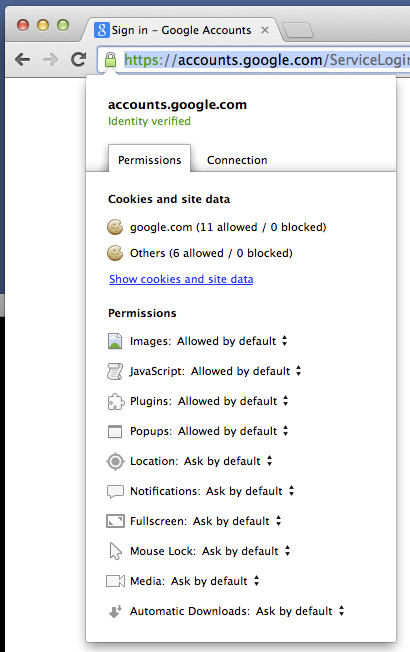 As you can see, it has a lot of stuff in it, with 2 tabs to hold 2 (arguably 3:
site data, permissions, and connection state) broad categories of information
and controls about what the origin is and what it can do.
We are pretty sure the OIB does not show all and only the information and
controls that users need to understand and control an origin.
I believe the purpose of the OIB is to allow users to understand and control the
origin. It was previously called the Page Info Bubble (PIB), but in this
document I’ll use the more accurate name.
Since the OIB is the primary UI surface for control of an origin’s power, it
enables the increased appification of the web platform. It is thus very
important that we make it readily understandable and usable. See also
.
## Possible Goals
One can imagine the OIB serving a variety of purposes, including at least
display or control of:
Information about the permissions/capability grants/special powers an origin
has
Information about the transport security state of the origin
Authenticated + confidential; partially authenticated + confidential;
unauthenticated or broken authentication or not confidential
If authenticated: the certificate chain
Or a control to launch the certificate viewer or other
developer/operator debugging information
If authenticated: extra authentication information
Certificate Transparency status
Key pinning information
Controls to set user-defined authentication policy:
Accept this certificate
Pin to the key(s) in this certificate chain
…
The origin’s name
Historical context for the user’s past interaction with the origin
# times visited in some period
downloads
bookmarks
when or how often the origin has invoked powerful grants/APIs
…
Data the browser is storing locally for the origin
cookies
LocalStorage
…
Summary (storage quota, et c.)
Processes the browser is running locally for the origin
Service Workers
Geofences
Total/average/peak battery cost of this origin
…
Which extensions (if any) can access the origin
Others? Surely I’m forgetting something.
Obviously there’s no way we can really show/afford control of all that
information. That is especially true on small screens, but even on a large
screen it would be a crowded and overwhelming interface. (It already is.)
Therefore, we have to pick the most important and contextually-relevant
information and controls.
We could and should choose what to show in the OIB based on context. For
example, we could only show those grants that differ from the profile-wide
defaults; we might never show certain marginal grants or content settings in the
OIB; we might treat local storage quotas as a grant (iff the origin is about to
exceed some profile-wide default); and so on.
## Non-Goals
It is a non-goal to show all possible information and controls about an origin
in the OIB. We are assuming, probably correctly, that the OIB cannot be both
complete and usable. Since the OIB is so important, we should trade off in favor
of usability over completeness where there is a conflict.
## Current Goals
This section describes the current goals for Chrome on desktop platforms
(including ChromeOS, but possibly not Athena). For information about the OIB on
non-desktop platforms, see [Non-Desktop
Platforms](https://docs.google.com/document/d/12PoBVo0D331RqnzVJwI8zbFU1hMs-ZcXcjqqwkG-6nc/edit#heading=h.fumazaednf88),
below.
### Show The Origin Name
We should use the OIB to show the origin name in an unambiguous,
human-meaningful way. (As described in [Presenting Origins To
Users](/Home/chromium-security/enamel).)
For origins whose hostnames have many labels we should show at least the
effective TLD + 1 label. (We call this “eTLD + 1”.) For example if the full
hostname is “a.b.c.pants.shoes.socks.wrists.co.jp” the eTLD (as determined by
the [Public Suffix List](https://publicsuffix.org/)) is co.jp; that + 1 label
(“wrists”) yields “wrists.co.jp”. Although not technically exact —
a.b.c.pants.shoes.socks.wrists.co.jp is distinct from
a.b.c.skirts.shoes.socks.wrists.co.jp — eTLD + 1 strikes a reasonable balance
between correctness and understandability.
For origins whose hostnames are very long, due to a proliferation of labels or
of extremely long labels, we should again the show eTLD + 1. If there is not
room enough to show eTLD + 1, we should label the origin as possibly phishy
and/or having broken authentication. (Rationale: Even if the authentication is
perfectly good from a certificate or cryptographic perspective, it’s not good
enough if we can’t show it to users on the screen.)
### Show The Summarized Origin Security State
We assume that only developers and operators are likely to be interested in the
page-load’s complete security state.
The complete security state of a page-load is:
X.509 certificate chain;
Certificate Transparency status;
TLS and X.509 cryptographic parameters; and
key pinning status.
Since the OIB should be a primary UX surface for normal users, it should show
only:
a tri-state security indicator (“Good”: authenticated + confidential;
“Dubious”: partially authenticated + confidential; “Bad”: unauthenticated or
broken authentication or not confidential); and
a control to launch a full view of the security state.
The full view of the security state must show the complete security state as
defined above. It may also afford users control over key pinning and HSTS policy
(currently available only in chrome://net-internals/#hsts) and control over
trust in invalid certificate chains (as becomes necessary when a user opts to
proceed through a CERT_INVALID warning).
### Afford Control Of The Origin’s Special Grants
By special grants, I mean grants that the user has affirmatively changed from
the profile-wide defaults.
Note that if the profile-wide defaults change — because the user changed them in
chrome://settings/content or some future equivalent interface — then previously
“non-special” grants become effectively special, and we should consider showing
them in the OIB. For example, in a fresh profile the default grant for
geolocation is Ask. If a user visits maps.google.com and opts to Always give
that origin full access to the geolocation API, maps.google.com now has a
special grant. Assuming the user has not changed it,
[www.bing.com](http://www.bing.com) has the default grant and we might not show
it in the OIB. If the user later changes the default to always allow origins
full access to the geolocation API, the special grant to maps.google.com becomes
effectively non-special, and we might choose not to show it in the OIB. The
default grant to [www.bing.com](http://www.bing.com) remains non-special (even
though the actual grant has changed), and we might choose to continue not to
show it in the OIB.
Full control over all grants to the origin probably cannot fit in the OIB.
Therefore it should be relegated to a secondary interface such as
chrome://settings/content (or some future equivalent interface).
As you can see, it has a lot of stuff in it, with 2 tabs to hold 2 (arguably 3:
site data, permissions, and connection state) broad categories of information
and controls about what the origin is and what it can do.
We are pretty sure the OIB does not show all and only the information and
controls that users need to understand and control an origin.
I believe the purpose of the OIB is to allow users to understand and control the
origin. It was previously called the Page Info Bubble (PIB), but in this
document I’ll use the more accurate name.
Since the OIB is the primary UI surface for control of an origin’s power, it
enables the increased appification of the web platform. It is thus very
important that we make it readily understandable and usable. See also
.
## Possible Goals
One can imagine the OIB serving a variety of purposes, including at least
display or control of:
Information about the permissions/capability grants/special powers an origin
has
Information about the transport security state of the origin
Authenticated + confidential; partially authenticated + confidential;
unauthenticated or broken authentication or not confidential
If authenticated: the certificate chain
Or a control to launch the certificate viewer or other
developer/operator debugging information
If authenticated: extra authentication information
Certificate Transparency status
Key pinning information
Controls to set user-defined authentication policy:
Accept this certificate
Pin to the key(s) in this certificate chain
…
The origin’s name
Historical context for the user’s past interaction with the origin
# times visited in some period
downloads
bookmarks
when or how often the origin has invoked powerful grants/APIs
…
Data the browser is storing locally for the origin
cookies
LocalStorage
…
Summary (storage quota, et c.)
Processes the browser is running locally for the origin
Service Workers
Geofences
Total/average/peak battery cost of this origin
…
Which extensions (if any) can access the origin
Others? Surely I’m forgetting something.
Obviously there’s no way we can really show/afford control of all that
information. That is especially true on small screens, but even on a large
screen it would be a crowded and overwhelming interface. (It already is.)
Therefore, we have to pick the most important and contextually-relevant
information and controls.
We could and should choose what to show in the OIB based on context. For
example, we could only show those grants that differ from the profile-wide
defaults; we might never show certain marginal grants or content settings in the
OIB; we might treat local storage quotas as a grant (iff the origin is about to
exceed some profile-wide default); and so on.
## Non-Goals
It is a non-goal to show all possible information and controls about an origin
in the OIB. We are assuming, probably correctly, that the OIB cannot be both
complete and usable. Since the OIB is so important, we should trade off in favor
of usability over completeness where there is a conflict.
## Current Goals
This section describes the current goals for Chrome on desktop platforms
(including ChromeOS, but possibly not Athena). For information about the OIB on
non-desktop platforms, see [Non-Desktop
Platforms](https://docs.google.com/document/d/12PoBVo0D331RqnzVJwI8zbFU1hMs-ZcXcjqqwkG-6nc/edit#heading=h.fumazaednf88),
below.
### Show The Origin Name
We should use the OIB to show the origin name in an unambiguous,
human-meaningful way. (As described in [Presenting Origins To
Users](/Home/chromium-security/enamel).)
For origins whose hostnames have many labels we should show at least the
effective TLD + 1 label. (We call this “eTLD + 1”.) For example if the full
hostname is “a.b.c.pants.shoes.socks.wrists.co.jp” the eTLD (as determined by
the [Public Suffix List](https://publicsuffix.org/)) is co.jp; that + 1 label
(“wrists”) yields “wrists.co.jp”. Although not technically exact —
a.b.c.pants.shoes.socks.wrists.co.jp is distinct from
a.b.c.skirts.shoes.socks.wrists.co.jp — eTLD + 1 strikes a reasonable balance
between correctness and understandability.
For origins whose hostnames are very long, due to a proliferation of labels or
of extremely long labels, we should again the show eTLD + 1. If there is not
room enough to show eTLD + 1, we should label the origin as possibly phishy
and/or having broken authentication. (Rationale: Even if the authentication is
perfectly good from a certificate or cryptographic perspective, it’s not good
enough if we can’t show it to users on the screen.)
### Show The Summarized Origin Security State
We assume that only developers and operators are likely to be interested in the
page-load’s complete security state.
The complete security state of a page-load is:
X.509 certificate chain;
Certificate Transparency status;
TLS and X.509 cryptographic parameters; and
key pinning status.
Since the OIB should be a primary UX surface for normal users, it should show
only:
a tri-state security indicator (“Good”: authenticated + confidential;
“Dubious”: partially authenticated + confidential; “Bad”: unauthenticated or
broken authentication or not confidential); and
a control to launch a full view of the security state.
The full view of the security state must show the complete security state as
defined above. It may also afford users control over key pinning and HSTS policy
(currently available only in chrome://net-internals/#hsts) and control over
trust in invalid certificate chains (as becomes necessary when a user opts to
proceed through a CERT_INVALID warning).
### Afford Control Of The Origin’s Special Grants
By special grants, I mean grants that the user has affirmatively changed from
the profile-wide defaults.
Note that if the profile-wide defaults change — because the user changed them in
chrome://settings/content or some future equivalent interface — then previously
“non-special” grants become effectively special, and we should consider showing
them in the OIB. For example, in a fresh profile the default grant for
geolocation is Ask. If a user visits maps.google.com and opts to Always give
that origin full access to the geolocation API, maps.google.com now has a
special grant. Assuming the user has not changed it,
[www.bing.com](http://www.bing.com) has the default grant and we might not show
it in the OIB. If the user later changes the default to always allow origins
full access to the geolocation API, the special grant to maps.google.com becomes
effectively non-special, and we might choose not to show it in the OIB. The
default grant to [www.bing.com](http://www.bing.com) remains non-special (even
though the actual grant has changed), and we might choose to continue not to
show it in the OIB.
Full control over all grants to the origin probably cannot fit in the OIB.
Therefore it should be relegated to a secondary interface such as
chrome://settings/content (or some future equivalent interface).